
[Ansible] Kubespray: Kubespray를 위한 Ansible 기초 - 6. 팩트(Facts)
서종호(가시다)님의 On-Premise K8s Hands-on Study 2주차 학습 내용을 기반으로 합니다.
TL;DR
이번 글의 목표는 Ansible 팩트(Facts)의 개념과 활용법 이해다.
- 팩트: 관리 호스트에서 자동으로 수집되는 시스템 정보
- 접근 방법:
ansible_facts.변수명(권장) 또는ansible_변수명 - 팩트 수집 제어:
gather_facts: no로 비활성화 가능 - 팩트 캐싱: 파일 또는 DB에 저장하여 재사용 가능
팩트(Facts)란?
개념
팩트는 Ansible이 관리 호스트에서 자동으로 수집하는 시스템 정보 변수다. Playbook 실행 시 Gathering Facts 단계에서 수집되며, 조건문이나 템플릿에서 활용할 수 있다.
수집되는 정보 예시:
- 호스트명
- 커널 버전
- 운영체제 종류 및 버전
- 커널 버전
- 네트워크 인터페이스 및 IP 주소
- CPU 개수, 메모리 용량
- 디스크 파티션 정보
- 스토리지 장치 크기 및 여유 공간
- …
Kubespray에서의 활용
Kubespray는 팩트를 활용하여 다양한 환경에 Kubernetes를 배포한다:
- internal_facts.yml: 내부 팩트 수집 Playbook
- network_facts Role: 네트워크 팩트 수집 Role
참고: 공식 문서
실습 1: 팩트 출력
전체 팩트 출력
# (server) #
cat <<'EOT' > facts.yml
---
- hosts: db
  tasks:
    - name: Print all facts
      ansible.builtin.debug:
        var: ansible_facts
EOT
# (server) #
ansible-playbook facts.yml
TASK [Gathering Facts] *********************************************************
ok: [tnode3]

TASK [Print all facts] *********************************************************
ok: [tnode3] => {
    "ansible_facts": {
        ...
        "hostname": "tnode3",
        ...
        "default_ipv4": {
            "address": "10.10.1.13",
            ...
        },
        ...
        "os_family": "RedHat",
        "distribution": "Rocky",
        ...
    }
}
ansible_facts 변수에 호스트의 모든 시스템 정보가 딕셔너리 형태로 저장된다.
주요 팩트 변수
| 정보 | 팩트 변수 |
|---|---|
| 호스트명 | ansible_facts.hostname |
| FQDN | ansible_facts.fqdn |
| 기본 IPv4 주소 | ansible_facts.default_ipv4.address |
| 네트워크 인터페이스 목록 | ansible_facts.interfaces |
| DNS 서버 목록 | ansible_facts.dns.nameservers |
| 커널 버전 | ansible_facts.kernel |
| 운영체제 | ansible_facts.distribution |
| OS 계열 | ansible_facts.os_family |
실습 2: 특정 팩트 추출
Playbook 작성
# (server) #
cat <<'EOT' > facts1.yml
---
- hosts: db
  tasks:
    - name: Print specific facts
      ansible.builtin.debug:
        msg: >
          The default IPv4 address of
          is
EOT
실행 결과
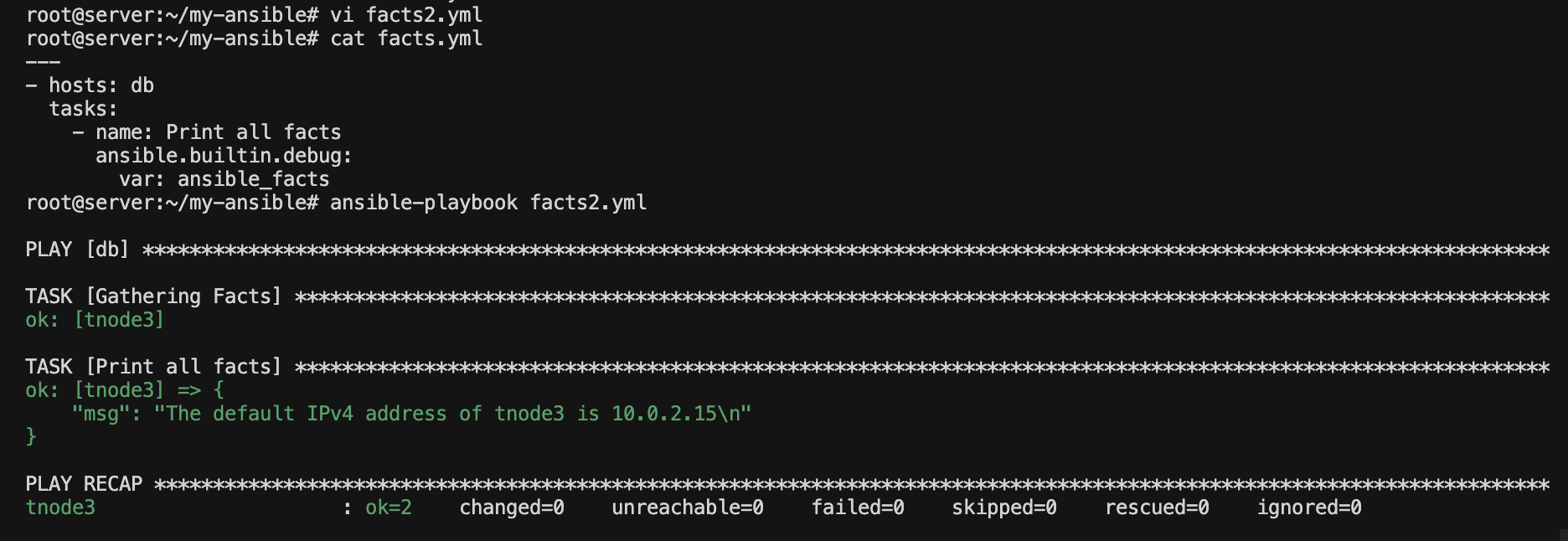
# (server) #
ansible-playbook facts1.yml
TASK [Print specific facts] ****************************************************
ok: [tnode3] => {
    "msg": "The default IPv4 address of tnode3 is 10.10.1.13"
}
ansible_facts.변수명 형식으로 특정 팩트 값에 접근할 수 있다.
팩트 표기법
두 가지 표기법
Ansible은 팩트 접근에 두 가지 표기법을 지원한다.
- 구 표기법(legacy notation):
ansible_접두사를 사용해 팩트에 직접 접근하는 방식 - 권장 표기법(recommended notation):
ansible_facts네임스페이스를 통해 명시적으로 접근하는 방식. Ansible 2.x 이후 권장됨
| 구 표기법 | 권장 표기법 |
|---|---|
ansible_hostname |
ansible_facts.hostname |
ansible_fqdn |
ansible_facts.fqdn |
ansible_default_ipv4.address |
ansible_facts.default_ipv4.address |
ansible_distribution |
ansible_facts.distribution |
Ansible 설정 inject_facts_as_vars를 true로 설정하면, 구 표기법도 사용할 수 있다. 해당 변수 설정 기본 값은 true이기 때문에, 현재는 두 표기법 모두 사용 가능하다. 만약 false로 설정하면 구 표기법(ansible_*)이 비활성화된다. 다만, 대부분의 플레이북에서 이전 표기법인 ansible_* 방식을 사용하므로, 기본 설정값을 그대로 사용하는 것이 좋다.
권장 표기법 사용 이유
ansible_facts.* 표기법이 권장되는 이유는 다음과 같다:
- 네임스페이스 분리: 사용자 정의 변수와 충돌 방지
- 명확성: 팩트임을 명시적으로 표현
- 향후 호환성: Ansible 2.x 이후 권장되는 방식
구 표기법 사용 예시
# (server) #
cat <<'EOT' > facts2.yml
---
- hosts: db
  tasks:
    - name: Print facts (old notation)
      ansible.builtin.debug:
        msg: >
          The node's host name is    # 구버전 표기법
          and the ip is  # 구버전 표기법
EOT
# (server) #
ansible-playbook facts2.yml
TASK [Print facts (old notation)] **********************************************
ok: [tnode3] => {
    "msg": "The node's host name is tnode3 and the ip is 10.10.1.13"
}
기존 Playbook과의 호환성을 위해 구 표기법도 동작하지만, 새로 작성하는 Playbook에서는 ansible_facts.* 표기법을 사용하는 것이 좋다.
구 표기법 사용 비활성화
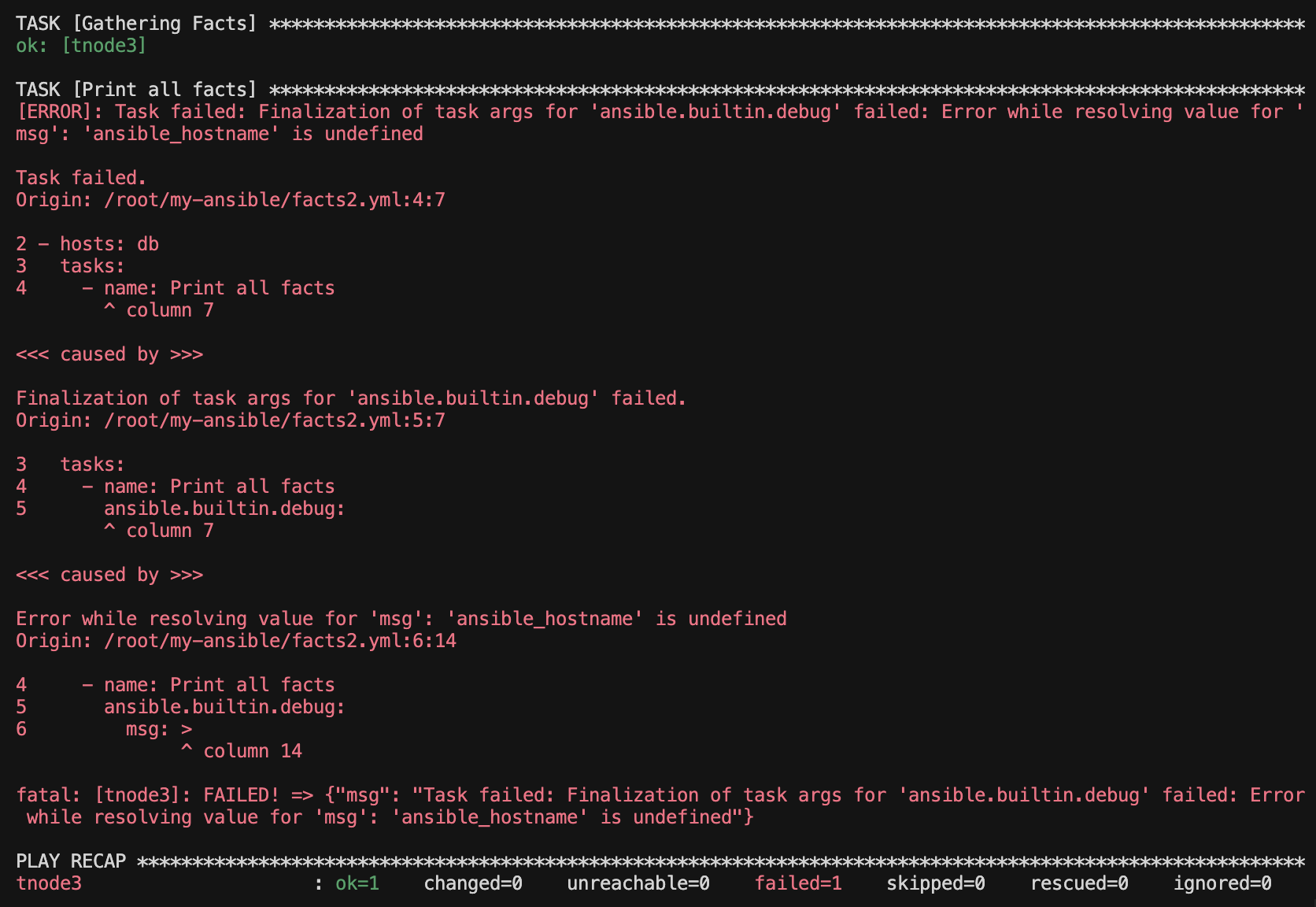
Ansible 설정에서 inject_facts_as_vars 값을 false로 설정한다.
[defaults]
inventory = ./inventory
remote_user = root
ask_pass = false
inject_facts_as_vars = false # 구버전 팩트 표기 사용 비활성화

[privilege_escalation]
become = true
become_method = sudo
become_user = root
become_ask_pass = false
그러면, ansible_hostname 등 구버전 표기법을 사용해 표시한 팩트는 사용할 수 없다고 나온다.
실습 3: 팩트 수집 비활성화
Ansible이 팩트를 수집할 때 관리 호스트에서 어떤 프로세스가 동작하는지 실시간으로 관찰해보자. 이를 통해 팩트 수집이 시스템에 미치는 영향을 이해할 수 있다.
팩트 수집 프로세스 모니터링
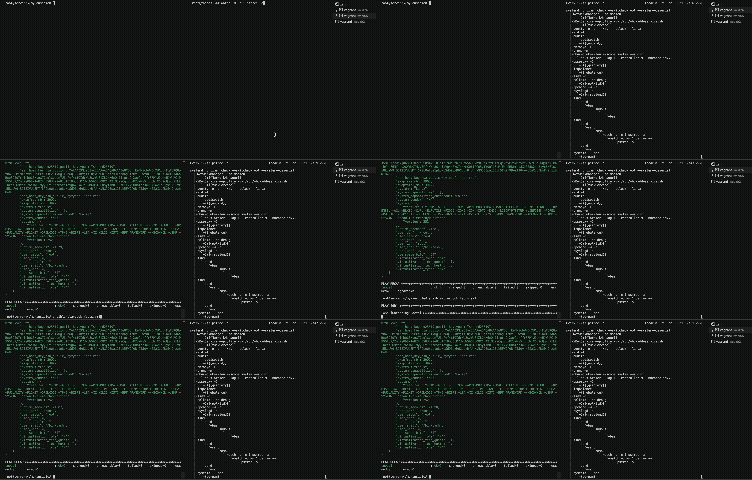
터미널 2개를 사용하여 동시에 모니터링과 실행을 진행한다.
# (터미널 1: 모니터링 창) tnode3에 SSH 접속 후 프로세스 모니터링
ssh tnode3
watch -d -n 1 pstree -a  # 1초마다 프로세스 트리 갱신, 변경사항 하이라이트
# (터미널 2: 실행 창) ansible-server에서 플레이북 반복 실행
ansible-playbook facts.yml
ansible-playbook facts.yml
ansible-playbook facts.yml
플레이북을 반복 실행하면서 터미널 1에서 Python 프로세스와 setup 모듈이 실행되는 것을 확인할 수 있다. 팩트 수집은 관리 호스트에서 여러 명령을 실행하고 시스템 정보를 수집하므로 일정한 시스템 부하를 발생시킨다.
팩트 수집이 필요 없는 경우
다음과 같은 경우 팩트 수집을 비활성화할 수 있다:
- 팩트 수집에 필요한 패키지를 설치할 수 없는 경우
- 호스트에 부하를 줄이고 싶은 경우
- 팩트 정보가 필요 없는 단순 작업인 경우
gather_facts: no
# (server) #
cat <<'EOT' > facts3.yml
---
- hosts: db
  gather_facts: no # 팩트 수집 비활성화 처리
  tasks:
    - name: Print message
      ansible.builtin.debug:
        msg: Hello Ansible World
EOT
# (server) #
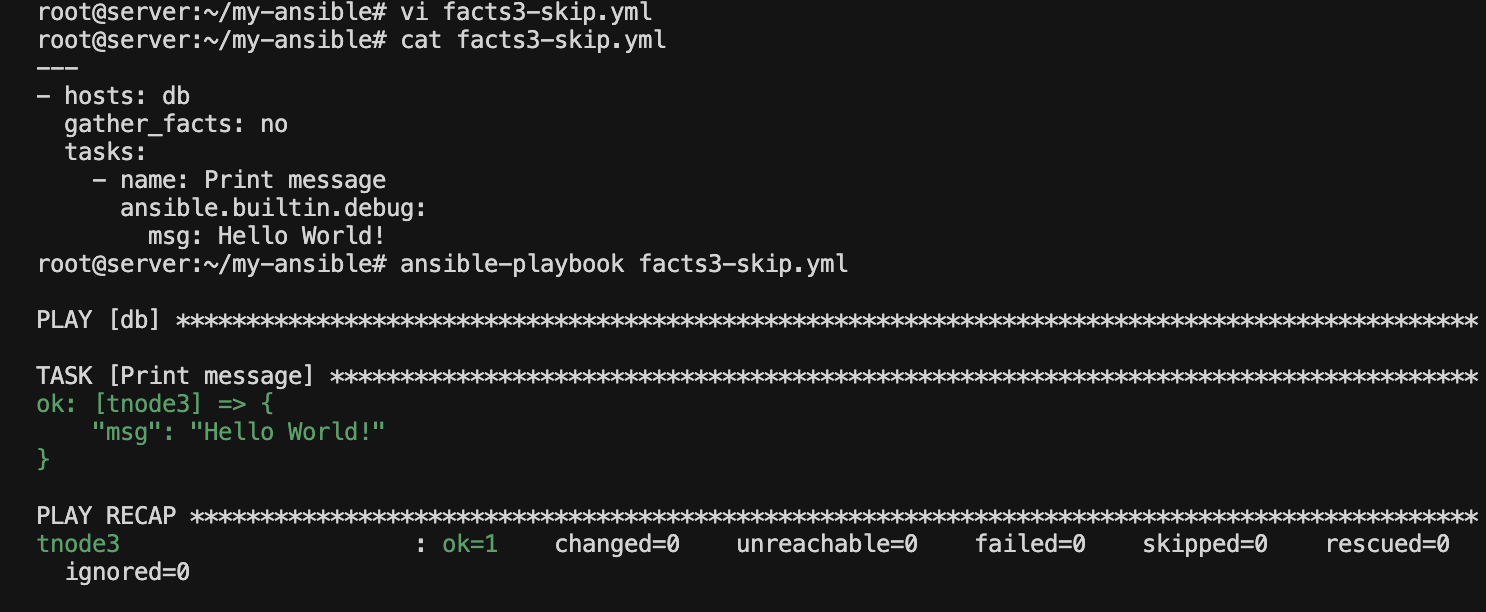
ansible-playbook facts3.yml
PLAY [db] **********************************************************************

TASK [Print message] ***********************************************************
ok: [tnode3] => {
    "msg": "Hello Ansible World"
}

PLAY RECAP *********************************************************************
tnode3                     : ok=1    changed=0    ...
Gathering Facts 단계가 생략되고 바로 Task가 실행된다.
팩트 비활성화 시 주의사항
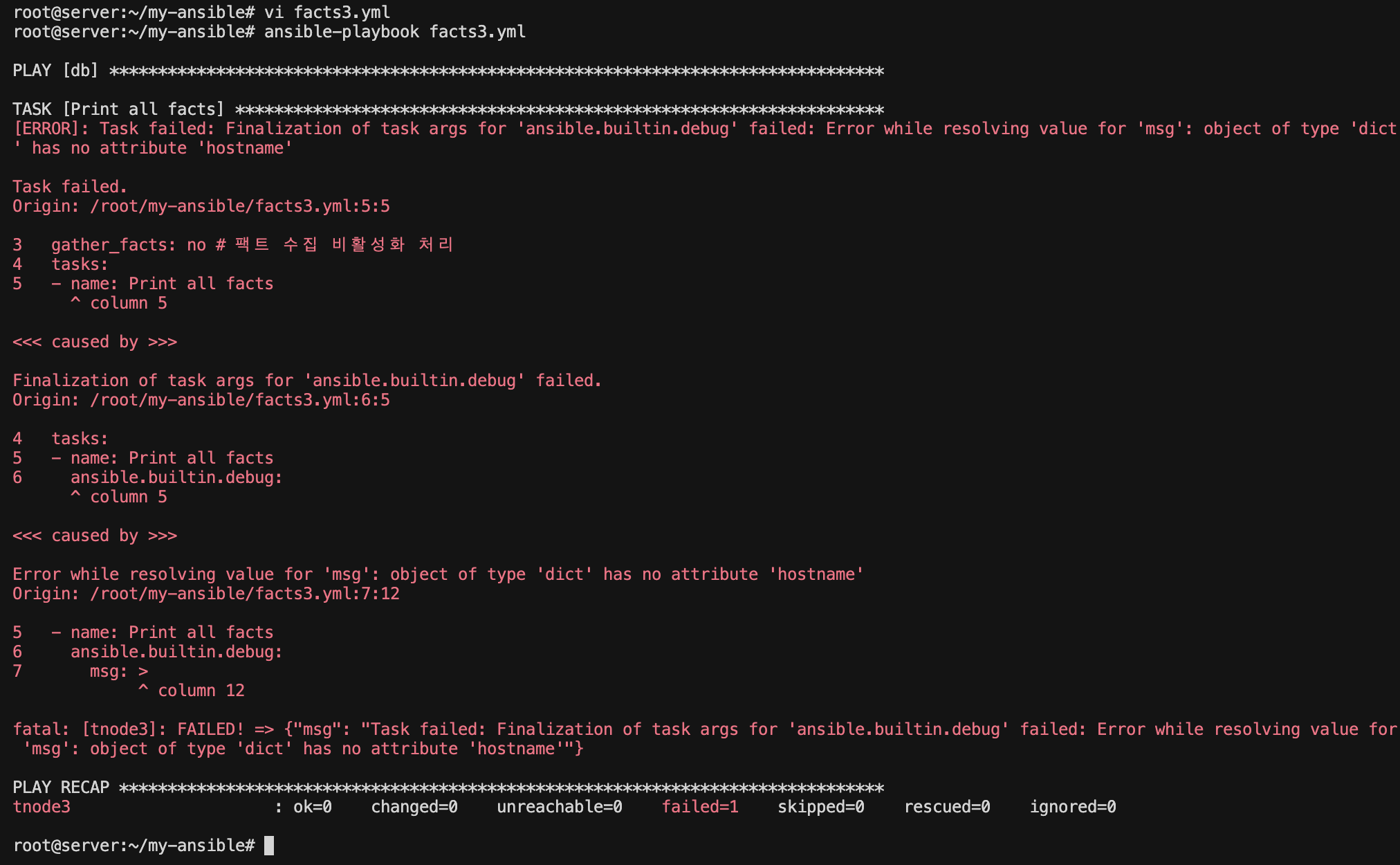
팩트 수집을 비활성화한 상태에서 팩트 변수를 사용하면 오류가 발생한다:
# (server) #
cat <<'EOT' > facts3.yml
---
- hosts: db
  gather_facts: no # 팩트 수집 비활성화 처리
  tasks:
    - name: Print all facts
      ansible.builtin.debug:
        msg: "Hostname: "
EOT
# (server) #
ansible-playbook facts3.yml
TASK [Print all facts] *************************************************
fatal: [tnode3]: FAILED! => {"msg": "The task includes an option with an undefined variable..."}
setup 모듈로 수동 수집
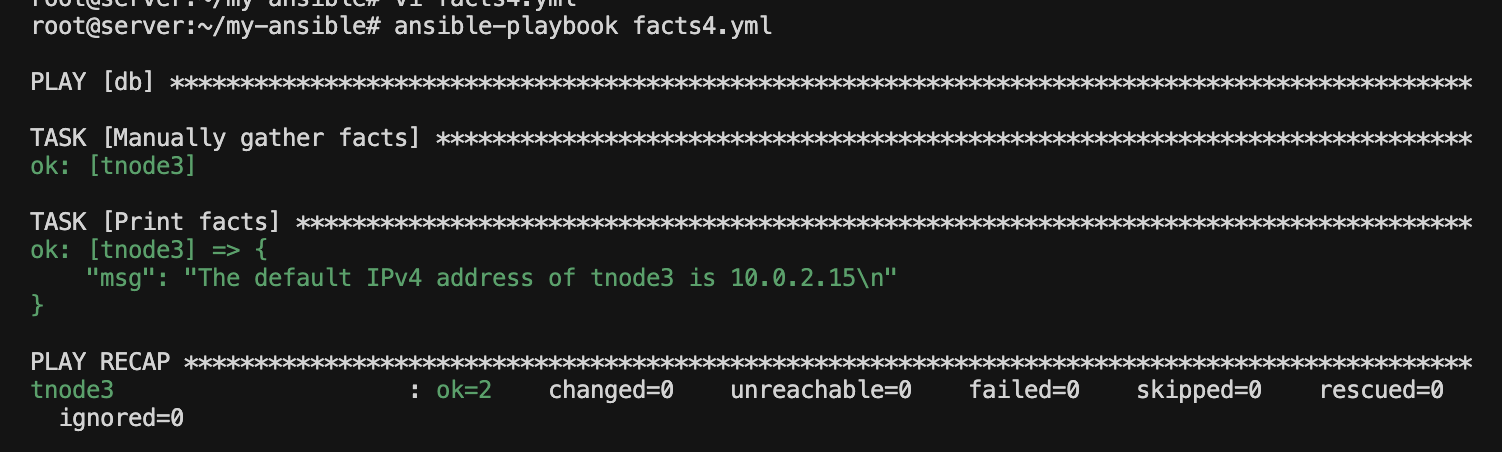
팩트 수집을 비활성화했지만 특정 시점에 팩트가 필요한 경우, ansible.builtin.setup 모듈을 사용하여 수동으로 수집할 수 있다:
# (server) #
cat <<'EOT' > facts4.yml
---
- hosts: db
  gather_facts: no
  tasks:
    - name: Manually gather facts
      ansible.builtin.setup:

    - name: Print facts
      ansible.builtin.debug:
        msg: >
          The default IPv4 address of
          is
EOT
# (server) #
ansible-playbook facts4.yml
TASK [Manually gather facts] ***************************************************
ok: [tnode3]

TASK [Print facts] *************************************************************
ok: [tnode3] => {
    "msg": "The default IPv4 address of tnode3 is 10.10.1.13"
}
Gathering Facts 단계 없이 Manually gather facts 단계로 진입한다.
참고:
ansible.builtin.setup모듈팩트를 수집하는 모듈이다.
Gathering Facts단계에서 내부적으로 이 모듈이 호출된다.
팩트 캐싱
개념
팩트 정보를 파일이나 데이터베이스에 캐싱하여 재사용할 수 있다. 캐싱을 사용하면 동일한 호스트에 대해 반복적으로 팩트를 수집하지 않아도 된다.
기본 동작 (캐싱 없음):
- 팩트는 플레이북 실행 시 메모리에만 임시 저장된다
- 플레이북이 종료되면 팩트 정보도 사라진다
- 다음 플레이북 실행 시 처음부터 다시 수집해야 한다
팩트 캐싱 사용 시:
- 팩트 정보를 파일이나 데이터베이스에 영구 저장한다
- 동일한 호스트에 대해 반복적으로 수집하지 않아도 된다
- 캐시된 정보를 재사용하여 실행 시간과 네트워크 부하를 줄인다
캐싱 설정
ansible.cfg에 다음 설정을 추가한다:
[defaults]
inventory = ./inventory
remote_user = root
ask_pass = false

# 팩트 캐싱 설정(추가)
gathering = smart
fact_caching = jsonfile
fact_caching_connection = ./fact_cache
| 설정 | 설명 |
|---|---|
gathering |
팩트 수집 정책: implicit(기본값, 항상 수집), explicit(명시적 지정 시만), smart(캐시 활용) - 참고 |
fact_caching |
캐시 플러그인 (memory, jsonfile, redis 등) |
fact_caching_connection |
캐시 연결 정의 또는 캐시 저장 경로 - 문서 |
캐싱 효과 확인
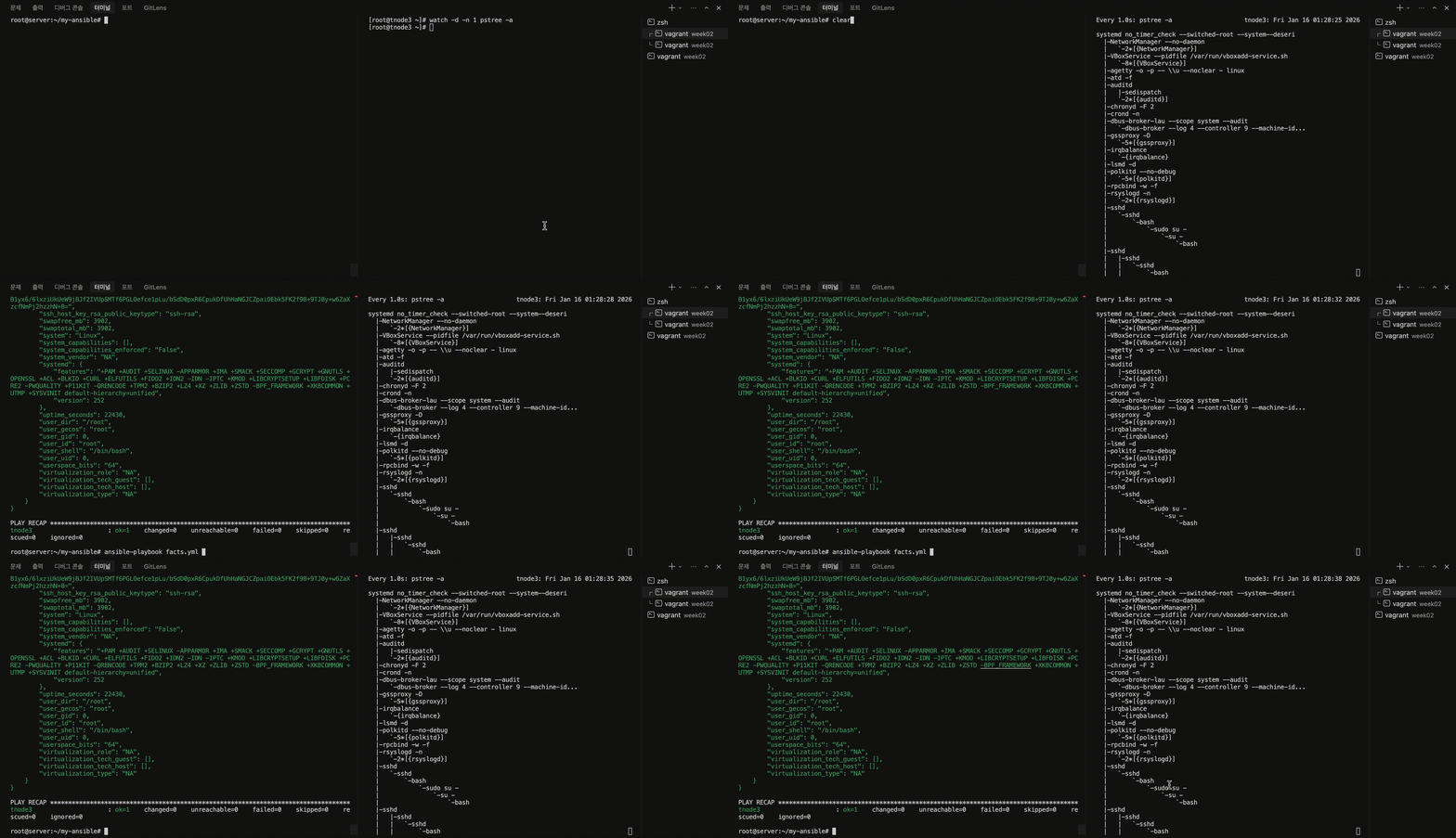
팩트 캐싱을 설정한 뒤, 같은 플레이북을 반복 실행하면 다음과 같은 효과를 확인할 수 있다:
- 첫 실행: 팩트 수집 프로세스가 실행되고 캐시 파일 생성
- 두 번째 실행부터: 캐시에서 팩트를 불러오므로 프로세스 생성 없음
- 실행 시간 단축: 팩트 수집 단계를 건너뛰어 빠른 실행
아래 watch pstree 모니터링 화면과 플레이북 실행 화면을 비교하면, 캐싱 사용 시 관리 호스트에 부하가 발생하지 않는 것을 확인할 수 있다.
참고: 팩트 캐싱 문서
사용자 지정 팩트
사용자가 직접 팩트를 정의할 수도 있다. 관리 호스트의 /etc/ansible/facts.d/ 디렉터리에 *.fact 파일을 생성하면 Ansible이 자동으로 수집한다.
# (managed node) #
# 디렉터리 생성
mkdir -p /etc/ansible/facts.d

# 사용자 지정 팩트 파일 생성
cat <<'EOT' > /etc/ansible/facts.d/my-custom.fact
[packages]
web_package = httpd
db_package = mariadb-server

[users]
user1 = ansible
user2 = gasida
EOT
사용자 지정 팩트는 ansible_local 변수를 통해 접근할 수 있다:
- name: Print custom facts
  ansible.builtin.debug:
    var: ansible_local
"ansible_local": {
    "my-custom": {
        "packages": {
            "db_package": "mariadb-server",
            "web_package": "httpd"
        },
        "users": {
            "user1": "ansible",
            "user2": "gasida"
        }
    }
}
실습 4: 커널 버전과 운영 체제 종류 출력
ansible_facts를 활용하여 모든 관리 호스트의 커널 버전과 운영 체제 종류를 출력해 보자.
# (server) #
cat <<'EOT' > facts6.yml
---
- hosts: all
  tasks:
    - name: Print kernel version and os
      ansible.builtin.debug:
        msg: >
          The default kernel of
          is .
          The OS of
          is  in
EOT
# (server) #
ansible-playbook facts6.yml
LAY [all] ***************************************************************************************************

TASK [Gathering Facts] ***************************************************************************************
ok: [tnode3]
ok: [tnode1]
ok: [tnode2]

TASK [Print kernel version and os] ***************************************************************************
ok: [tnode1] => {
    "msg": "The default kernel of tnode1 is 6.8.0-86-generic. The OS of tnode1  is Ubuntu in Debian\n"
}
ok: [tnode2] => {
    "msg": "The default kernel of tnode2 is 6.8.0-86-generic. The OS of tnode2  is Ubuntu in Debian\n"
}
ok: [tnode3] => {
    "msg": "The default kernel of tnode3 is 5.14.0-570.52.1.el9_6.aarch64. The OS of tnode3  is Rocky in RedHat\n"
}

PLAY RECAP ***************************************************************************************************
tnode1                     : ok=2    changed=0    unreachable=0    failed=0    skipped=0    rescued=0    ignored=0
tnode2                     : ok=2    changed=0    unreachable=0    failed=0    skipped=0    rescued=0    ignored=0
tnode3                     : ok=2    changed=0    unreachable=0    failed=0    skipped=0    rescued=0    ignored=0
사용된 팩트:
ansible_facts.hostname: 호스트명ansible_facts.kernel: 커널 버전ansible_facts.distribution: 운영 체제 배포판 (예: Rocky, Ubuntu)ansible_facts.os_family: 운영 체제 계열 (예: RedHat, Debian)
결과
이 글을 완료하면 다음과 같은 결과를 얻을 수 있다:
- 팩트 개념 이해: 관리 호스트에서 자동 수집되는 시스템 정보
- 팩트 접근 방법:
ansible_facts.변수명표기법 (권장) - 팩트 수집 제어:
gather_facts: no또는setup모듈 - 팩트 캐싱: 파일/DB에 저장하여 재사용
팩트를 활용하면 호스트별 시스템 정보를 기반으로 조건 분기나 동적 설정이 가능하다. 이전 글에서 when 조건문에 ansible_facts['os_family']를 사용한 것이 대표적인 예다. Kubespray도 팩트를 통해 다양한 OS와 환경에 Kubernetes를 배포한다.
다음 글에서는 반복문을 활용하여 더 효율적인 Playbook을 작성하는 방법을 알아본다.
참고: fact 전체
전체 Ansible Facts 확인
ok: [tnode3] => {
"ansible_facts": {
// 네트워크 설정: 호스트의 모든 IPv4 주소 목록
"all_ipv4_addresses": [
"10.10.1.13", // Private network interface
"10.0.2.15" // NAT interface
],
// 네트워크 설정: 호스트의 모든 IPv6 주소 목록
"all_ipv6_addresses": [
"fe80::a00:27ff:feaf:7658",
"fd17:625c:f037:2:a00:27ff:fe1f:ae8b",
"fe80::a00:27ff:fe1f:ae8b"
],
"ansible_local": {},
// 보안: AppArmor 상태 (SELinux와 유사한 보안 모듈)
"apparmor": {
"status": "disabled"
},
// 시스템 아키텍처: ARM64 (Apple Silicon 등)
"architecture": "aarch64",
"bios_date": "NA",
"bios_vendor": "NA",
"bios_version": "NA",
"board_asset_tag": "NA",
"board_name": "NA",
"board_serial": "NA",
"board_vendor": "NA",
"board_version": "NA",
"chassis_asset_tag": "NA",
"chassis_serial": "NA",
"chassis_vendor": "NA",
"chassis_version": "NA",
"cmdline": {
"BOOT_IMAGE": "(hd0,gpt3)/boot/vmlinuz-5.14.0-570.52.1.el9_6.aarch64",
"console": "ttyS0,115200n8",
"no_timer_check": true,
"ro": true,
"root": "UUID=858fc44c-7093-420e-8ecd-aad817736634"
},
// 시간 정보: 조건 분기, 로그 타임스탬프 등에 활용
"date_time": {
"date": "2026-01-16",
"day": "16",
"epoch": "1768491817",
"epoch_int": "1768491817",
"hour": "00",
"iso8601": "2026-01-15T15:43:37Z",
"iso8601_basic": "20260116T004337988041",
"iso8601_basic_short": "20260116T004337",
"iso8601_micro": "2026-01-15T15:43:37.988041Z",
"minute": "43",
"month": "01",
"second": "37",
"time": "00:43:37",
"tz": "KST",
"tz_dst": "KST",
"tz_offset": "+0900",
"weekday": "Friday",
"weekday_number": "5",
"weeknumber": "02",
"year": "2026"
},
// 중요: 기본 IPv4 인터페이스 정보 (네트워크 설정 시 주로 사용)
"default_ipv4": {
"address": "10.0.2.15", // 호스트의 기본 IP 주소
"alias": "enp0s8",
"broadcast": "10.0.2.255",
"gateway": "10.0.2.2", // 기본 게이트웨이
"interface": "enp0s8", // 네트워크 인터페이스 이름
"macaddress": "08:00:27:1f:ae:8b",
"mtu": 1500,
"netmask": "255.255.255.0",
"network": "10.0.2.0",
"prefix": "24",
"type": "ether"
},
"default_ipv6": {
"address": "fd17:625c:f037:2:a00:27ff:fe1f:ae8b",
"gateway": "fe80::2",
"interface": "enp0s8",
"macaddress": "08:00:27:1f:ae:8b",
"mtu": 1500,
"prefix": "64",
"scope": "global",
"type": "ether"
},
"device_links": {
"ids": {},
"labels": {},
"masters": {},
"uuids": {
"sda1": [
"19AA-5BCD"
],
"sda2": [
"170ab8d6-f3c1-4df4-a6c8-f5ca12bf7724"
],
"sda3": [
"858fc44c-7093-420e-8ecd-aad817736634"
]
}
},
"devices": {
"sda": {
"holders": [],
"host": "SCSI storage controller: Red Hat, Inc. Virtio 1.0 SCSI (rev 01)",
"links": {
"ids": [],
"labels": [],
"masters": [],
"uuids": []
},
"model": "HARDDISK",
"partitions": {
"sda1": {
"holders": [],
"links": {
"ids": [],
"labels": [],
"masters": [],
"uuids": [
"19AA-5BCD"
]
},
"sectors": 1228800,
"sectorsize": 512,
"size": "600.00 MB",
"start": "2048",
"uuid": "19AA-5BCD"
},
"sda2": {
"holders": [],
"links": {
"ids": [],
"labels": [],
"masters": [],
"uuids": [
"170ab8d6-f3c1-4df4-a6c8-f5ca12bf7724"
]
},
"sectors": 7993344,
"sectorsize": 512,
"size": "3.81 GB",
"start": "1230848",
"uuid": "170ab8d6-f3c1-4df4-a6c8-f5ca12bf7724"
},
"sda3": {
"holders": [],
"links": {
"ids": [],
"labels": [],
"masters": [],
"uuids": [
"858fc44c-7093-420e-8ecd-aad817736634"
]
},
"sectors": 124991488,
"sectorsize": 512,
"size": "59.60 GB",
"start": "9224192",
"uuid": "858fc44c-7093-420e-8ecd-aad817736634"
}
},
"removable": "0",
"rotational": "1",
"sas_address": null,
"sas_device_handle": null,
"scheduler_mode": "none",
"sectors": 134217728,
"sectorsize": "512",
"size": "64.00 GB",
"support_discard": "0",
"vendor": "VBOX",
"virtual": 1
}
},
// 중요: OS 배포판 정보 (패키지 관리, when 조건 등에 활용)
"distribution": "Rocky", // Rocky Linux
"distribution_file_parsed": true,
"distribution_file_path": "/etc/redhat-release",
"distribution_file_variety": "RedHat", // RedHat 계열
"distribution_major_version": "9", // 메이저 버전
"distribution_release": "Blue Onyx",
"distribution_version": "9.6", // 전체 버전
// DNS 서버 정보
"dns": {
"nameservers": [
"168.126.63.1", // KT DNS
"168.126.63.2" // KT DNS
]
},
"domain": "",
"effective_group_id": 0,
"effective_user_id": 0,
"enp0s8": {
"active": true,
"device": "enp0s8",
"features": {
"esp_hw_offload": "off [fixed]",
"esp_tx_csum_hw_offload": "off [fixed]",
"generic_receive_offload": "on",
"generic_segmentation_offload": "on",
"highdma": "off [fixed]",
"hsr_dup_offload": "off [fixed]",
"hsr_fwd_offload": "off [fixed]",
"hsr_tag_ins_offload": "off [fixed]",
"hsr_tag_rm_offload": "off [fixed]",
"hw_tc_offload": "off [fixed]",
"l2_fwd_offload": "off [fixed]",
"large_receive_offload": "off [fixed]",
"loopback": "off [fixed]",
"macsec_hw_offload": "off [fixed]",
"ntuple_filters": "off [fixed]",
"receive_hashing": "off [fixed]",
"rx_all": "off",
"rx_checksumming": "off",
"rx_fcs": "off",
"rx_gro_hw": "off [fixed]",
"rx_gro_list": "off",
"rx_udp_gro_forwarding": "off",
"rx_udp_tunnel_port_offload": "off [fixed]",
"rx_vlan_filter": "on [fixed]",
"rx_vlan_offload": "on",
"rx_vlan_stag_filter": "off [fixed]",
"rx_vlan_stag_hw_parse": "off [fixed]",
"scatter_gather": "on",
"tcp_segmentation_offload": "on",
"tls_hw_record": "off [fixed]",
"tls_hw_rx_offload": "off [fixed]",
"tls_hw_tx_offload": "off [fixed]",
"tx_checksum_fcoe_crc": "off [fixed]",
"tx_checksum_ip_generic": "on",
"tx_checksum_ipv4": "off [fixed]",
"tx_checksum_ipv6": "off [fixed]",
"tx_checksum_sctp": "off [fixed]",
"tx_checksumming": "on",
"tx_esp_segmentation": "off [fixed]",
"tx_fcoe_segmentation": "off [fixed]",
"tx_gre_csum_segmentation": "off [fixed]",
"tx_gre_segmentation": "off [fixed]",
"tx_gso_list": "off [fixed]",
"tx_gso_partial": "off [fixed]",
"tx_gso_robust": "off [fixed]",
"tx_ipxip4_segmentation": "off [fixed]",
"tx_ipxip6_segmentation": "off [fixed]",
"tx_nocache_copy": "off",
"tx_scatter_gather": "on",
"tx_scatter_gather_fraglist": "off [fixed]",
"tx_sctp_segmentation": "off [fixed]",
"tx_tcp6_segmentation": "off [fixed]",
"tx_tcp_ecn_segmentation": "off [fixed]",
"tx_tcp_mangleid_segmentation": "off",
"tx_tcp_segmentation": "on",
"tx_tunnel_remcsum_segmentation": "off [fixed]",
"tx_udp_segmentation": "off [fixed]",
"tx_udp_tnl_csum_segmentation": "off [fixed]",
"tx_udp_tnl_segmentation": "off [fixed]",
"tx_vlan_offload": "on [fixed]",
"tx_vlan_stag_hw_insert": "off [fixed]",
"vlan_challenged": "off [fixed]"
},
"hw_timestamp_filters": [],
"ipv4": {
"address": "10.0.2.15",
"broadcast": "10.0.2.255",
"netmask": "255.255.255.0",
"network": "10.0.2.0",
"prefix": "24"
},
"ipv6": [
{
"address": "fd17:625c:f037:2:a00:27ff:fe1f:ae8b",
"prefix": "64",
"scope": "global"
},
{
"address": "fe80::a00:27ff:fe1f:ae8b",
"prefix": "64",
"scope": "link"
}
],
"macaddress": "08:00:27:1f:ae:8b",
"module": "e1000",
"mtu": 1500,
"pciid": "0000:00:08.0",
"promisc": false,
"speed": 1000,
"timestamping": [],
"type": "ether"
},
"enp0s9": {
"active": true,
"device": "enp0s9",
"features": {
"esp_hw_offload": "off [fixed]",
"esp_tx_csum_hw_offload": "off [fixed]",
"generic_receive_offload": "on",
"generic_segmentation_offload": "on",
"highdma": "off [fixed]",
"hsr_dup_offload": "off [fixed]",
"hsr_fwd_offload": "off [fixed]",
"hsr_tag_ins_offload": "off [fixed]",
"hsr_tag_rm_offload": "off [fixed]",
"hw_tc_offload": "off [fixed]",
"l2_fwd_offload": "off [fixed]",
"large_receive_offload": "off [fixed]",
"loopback": "off [fixed]",
"macsec_hw_offload": "off [fixed]",
"ntuple_filters": "off [fixed]",
"receive_hashing": "off [fixed]",
"rx_all": "off",
"rx_checksumming": "off",
"rx_fcs": "off",
"rx_gro_hw": "off [fixed]",
"rx_gro_list": "off",
"rx_udp_gro_forwarding": "off",
"rx_udp_tunnel_port_offload": "off [fixed]",
"rx_vlan_filter": "on [fixed]",
"rx_vlan_offload": "on",
"rx_vlan_stag_filter": "off [fixed]",
"rx_vlan_stag_hw_parse": "off [fixed]",
"scatter_gather": "on",
"tcp_segmentation_offload": "on",
"tls_hw_record": "off [fixed]",
"tls_hw_rx_offload": "off [fixed]",
"tls_hw_tx_offload": "off [fixed]",
"tx_checksum_fcoe_crc": "off [fixed]",
"tx_checksum_ip_generic": "on",
"tx_checksum_ipv4": "off [fixed]",
"tx_checksum_ipv6": "off [fixed]",
"tx_checksum_sctp": "off [fixed]",
"tx_checksumming": "on",
"tx_esp_segmentation": "off [fixed]",
"tx_fcoe_segmentation": "off [fixed]",
"tx_gre_csum_segmentation": "off [fixed]",
"tx_gre_segmentation": "off [fixed]",
"tx_gso_list": "off [fixed]",
"tx_gso_partial": "off [fixed]",
"tx_gso_robust": "off [fixed]",
"tx_ipxip4_segmentation": "off [fixed]",
"tx_ipxip6_segmentation": "off [fixed]",
"tx_nocache_copy": "off",
"tx_scatter_gather": "on",
"tx_scatter_gather_fraglist": "off [fixed]",
"tx_sctp_segmentation": "off [fixed]",
"tx_tcp6_segmentation": "off [fixed]",
"tx_tcp_ecn_segmentation": "off [fixed]",
"tx_tcp_mangleid_segmentation": "off",
"tx_tcp_segmentation": "on",
"tx_tunnel_remcsum_segmentation": "off [fixed]",
"tx_udp_segmentation": "off [fixed]",
"tx_udp_tnl_csum_segmentation": "off [fixed]",
"tx_udp_tnl_segmentation": "off [fixed]",
"tx_vlan_offload": "on [fixed]",
"tx_vlan_stag_hw_insert": "off [fixed]",
"vlan_challenged": "off [fixed]"
},
"hw_timestamp_filters": [],
"ipv4": {
"address": "10.10.1.13",
"broadcast": "10.10.1.255",
"netmask": "255.255.255.0",
"network": "10.10.1.0",
"prefix": "24"
},
"ipv6": [
{
"address": "fe80::a00:27ff:feaf:7658",
"prefix": "64",
"scope": "link"
}
],
"macaddress": "08:00:27:af:76:58",
"module": "e1000",
"mtu": 1500,
"pciid": "0000:00:09.0",
"promisc": false,
"speed": 1000,
"timestamping": [],
"type": "ether"
},
"env": {
"BASH_FUNC_which%%": "() { ( alias;\n eval ${which_declare} ) | /usr/bin/which --tty-only --read-alias --read-functions --show-tilde --show-dot $@\n}",
"DBUS_SESSION_BUS_ADDRESS": "unix:path=/run/user/0/bus",
"DEBUGINFOD_IMA_CERT_PATH": "/etc/keys/ima:",
"DEBUGINFOD_URLS": "https://debuginfod.rockylinux.org/ ",
"HOME": "/root",
"LANG": "en_US.UTF-8",
"LESSOPEN": "||/usr/bin/lesspipe.sh %s",
"LOGNAME": "root",
"LS_COLORS": "rs=0:di=01;34:ln=01;36:mh=00:pi=40;33:so=01;35:do=01;35:bd=40;33;01:cd=40;33;01:or=40;31;01:mi=01;37;41:su=37;41:sg=30;43:ca=30;41:tw=30;42:ow=34;42:st=37;44:ex=01;32:*.tar=01;31:*.tgz=01;31:*.arc=01;31:*.arj=01;31:*.taz=01;31:*.lha=01;31:*.lz4=01;31:*.lzh=01;31:*.lzma=01;31:*.tlz=01;31:*.txz=01;31:*.tzo=01;31:*.t7z=01;31:*.zip=01;31:*.z=01;31:*.dz=01;31:*.gz=01;31:*.lrz=01;31:*.lz=01;31:*.lzo=01;31:*.xz=01;31:*.zst=01;31:*.tzst=01;31:*.bz2=01;31:*.bz=01;31:*.tbz=01;31:*.tbz2=01;31:*.tz=01;31:*.deb=01;31:*.rpm=01;31:*.jar=01;31:*.war=01;31:*.ear=01;31:*.sar=01;31:*.rar=01;31:*.alz=01;31:*.ace=01;31:*.zoo=01;31:*.cpio=01;31:*.7z=01;31:*.rz=01;31:*.cab=01;31:*.wim=01;31:*.swm=01;31:*.dwm=01;31:*.esd=01;31:*.jpg=01;35:*.jpeg=01;35:*.mjpg=01;35:*.mjpeg=01;35:*.gif=01;35:*.bmp=01;35:*.pbm=01;35:*.pgm=01;35:*.ppm=01;35:*.tga=01;35:*.xbm=01;35:*.xpm=01;35:*.tif=01;35:*.tiff=01;35:*.png=01;35:*.svg=01;35:*.svgz=01;35:*.mng=01;35:*.pcx=01;35:*.mov=01;35:*.mpg=01;35:*.mpeg=01;35:*.m2v=01;35:*.mkv=01;35:*.webm=01;35:*.webp=01;35:*.ogm=01;35:*.mp4=01;35:*.m4v=01;35:*.mp4v=01;35:*.vob=01;35:*.qt=01;35:*.nuv=01;35:*.wmv=01;35:*.asf=01;35:*.rm=01;35:*.rmvb=01;35:*.flc=01;35:*.avi=01;35:*.fli=01;35:*.flv=01;35:*.gl=01;35:*.dl=01;35:*.xcf=01;35:*.xwd=01;35:*.yuv=01;35:*.cgm=01;35:*.emf=01;35:*.ogv=01;35:*.ogx=01;35:*.aac=01;36:*.au=01;36:*.flac=01;36:*.m4a=01;36:*.mid=01;36:*.midi=01;36:*.mka=01;36:*.mp3=01;36:*.mpc=01;36:*.ogg=01;36:*.ra=01;36:*.wav=01;36:*.oga=01;36:*.opus=01;36:*.spx=01;36:*.xspf=01;36:",
"MOTD_SHOWN": "pam",
"PATH": "/root/.local/bin:/root/bin:/usr/local/sbin:/usr/local/bin:/usr/sbin:/usr/bin",
"PWD": "/root",
"SELINUX_LEVEL_REQUESTED": "",
"SELINUX_ROLE_REQUESTED": "",
"SELINUX_USE_CURRENT_RANGE": "",
"SHELL": "/bin/bash",
"SHLVL": "1",
"SSH_CLIENT": "10.10.1.10 41770 22",
"SSH_CONNECTION": "10.10.1.10 41770 10.10.1.13 22",
"SSH_TTY": "/dev/pts/1",
"TERM": "xterm-256color",
"USER": "root",
"XDG_RUNTIME_DIR": "/run/user/0",
"XDG_SESSION_CLASS": "user",
"XDG_SESSION_ID": "786",
"XDG_SESSION_TYPE": "tty",
"_": "/usr/bin/python3",
"which_declare": "declare -f"
},
"fibre_channel_wwn": [],
"fips": false,
"form_factor": "NA",
// 중요: 호스트 식별 정보
"fqdn": "tnode3", // Fully Qualified Domain Name
"gather_subset": [
"all"
],
"hostname": "tnode3", // 호스트명 (인벤토리 관리에 활용)
"hostnqn": "nqn.2014-08.org.nvmexpress:uuid:b4201204-1135-498b-8536-3a8fe83e7131",
// 네트워크 인터페이스 목록
"interfaces": [
"enp0s9", // Private network
"enp0s8", // NAT interface
"lo" // Loopback
],
"is_chroot": false,
"iscsi_iqn": "",
// 커널 정보 (드라이버 호환성 확인 등에 사용)
"kernel": "5.14.0-570.52.1.el9_6.aarch64",
"kernel_version": "#1 SMP PREEMPT_DYNAMIC Wed Oct 15 14:48:33 UTC 2025",
"lo": {
"active": true,
"device": "lo",
"features": {
"esp_hw_offload": "off [fixed]",
"esp_tx_csum_hw_offload": "off [fixed]",
"generic_receive_offload": "on",
"generic_segmentation_offload": "on",
"highdma": "on [fixed]",
"hsr_dup_offload": "off [fixed]",
"hsr_fwd_offload": "off [fixed]",
"hsr_tag_ins_offload": "off [fixed]",
"hsr_tag_rm_offload": "off [fixed]",
"hw_tc_offload": "off [fixed]",
"l2_fwd_offload": "off [fixed]",
"large_receive_offload": "off [fixed]",
"loopback": "on [fixed]",
"macsec_hw_offload": "off [fixed]",
"ntuple_filters": "off [fixed]",
"receive_hashing": "off [fixed]",
"rx_all": "off [fixed]",
"rx_checksumming": "on [fixed]",
"rx_fcs": "off [fixed]",
"rx_gro_hw": "off [fixed]",
"rx_gro_list": "off",
"rx_udp_gro_forwarding": "off",
"rx_udp_tunnel_port_offload": "off [fixed]",
"rx_vlan_filter": "off [fixed]",
"rx_vlan_offload": "off [fixed]",
"rx_vlan_stag_filter": "off [fixed]",
"rx_vlan_stag_hw_parse": "off [fixed]",
"scatter_gather": "on",
"tcp_segmentation_offload": "on",
"tls_hw_record": "off [fixed]",
"tls_hw_rx_offload": "off [fixed]",
"tls_hw_tx_offload": "off [fixed]",
"tx_checksum_fcoe_crc": "off [fixed]",
"tx_checksum_ip_generic": "on [fixed]",
"tx_checksum_ipv4": "off [fixed]",
"tx_checksum_ipv6": "off [fixed]",
"tx_checksum_sctp": "on [fixed]",
"tx_checksumming": "on",
"tx_esp_segmentation": "off [fixed]",
"tx_fcoe_segmentation": "off [fixed]",
"tx_gre_csum_segmentation": "off [fixed]",
"tx_gre_segmentation": "off [fixed]",
"tx_gso_list": "on",
"tx_gso_partial": "off [fixed]",
"tx_gso_robust": "off [fixed]",
"tx_ipxip4_segmentation": "off [fixed]",
"tx_ipxip6_segmentation": "off [fixed]",
"tx_nocache_copy": "off [fixed]",
"tx_scatter_gather": "on [fixed]",
"tx_scatter_gather_fraglist": "on [fixed]",
"tx_sctp_segmentation": "on",
"tx_tcp6_segmentation": "on",
"tx_tcp_ecn_segmentation": "on",
"tx_tcp_mangleid_segmentation": "on",
"tx_tcp_segmentation": "on",
"tx_tunnel_remcsum_segmentation": "off [fixed]",
"tx_udp_segmentation": "on",
"tx_udp_tnl_csum_segmentation": "off [fixed]",
"tx_udp_tnl_segmentation": "off [fixed]",
"tx_vlan_offload": "off [fixed]",
"tx_vlan_stag_hw_insert": "off [fixed]",
"vlan_challenged": "on [fixed]"
},
"hw_timestamp_filters": [],
"ipv4": {
"address": "127.0.0.1",
"broadcast": "",
"netmask": "255.0.0.0",
"network": "127.0.0.0",
"prefix": "8"
},
"ipv6": [
{
"address": "::1",
"prefix": "128",
"scope": "host"
}
],
"mtu": 65536,
"promisc": false,
"timestamping": [],
"type": "loopback"
},
"loadavg": {
"15m": 0.0,
"1m": 0.0,
"5m": 0.0
},
"locally_reachable_ips": {
"ipv4": [
"10.0.2.15",
"10.10.1.13",
"127.0.0.0/8",
"127.0.0.1"
],
"ipv6": [
"::1",
"fd17:625c:f037:2:a00:27ff:fe1f:ae8b",
"fe80::a00:27ff:fe1f:ae8b",
"fe80::a00:27ff:feaf:7658"
]
},
"lsb": {},
"lvm": {
"lvs": {},
"pvs": {},
"vgs": {}
},
"machine": "aarch64",
"machine_id": "c2094900ece1480580a0b7f68998f976",
// 중요: 메모리 정보 (리소스 요구사항 확인에 활용)
"memfree_mb": 750, // 사용 가능한 메모리(MB)
"memory_mb": {
"nocache": {
"free": 1080,
"used": 244
},
"real": {
"free": 750, // 실제 사용 가능 메모리
"total": 1324, // 전체 메모리
"used": 574
},
"swap": {
"cached": 0,
"free": 3902,
"total": 3902,
"used": 0
}
},
"memtotal_mb": 1324, // 전체 메모리(MB)
"module_setup": true,
"mounts": [
{
"block_available": 15091235,
"block_size": 4096,
"block_total": 15607552,
"block_used": 516317,
"device": "/dev/sda3",
"dump": 0,
"fstype": "xfs",
"inode_available": 31209721,
"inode_total": 31247872,
"inode_used": 38151,
"mount": "/",
"options": "rw,seclabel,relatime,attr2,inode64,logbufs=8,logbsize=32k,noquota",
"passno": 0,
"size_available": 61813698560,
"size_total": 63928532992,
"uuid": "858fc44c-7093-420e-8ecd-aad817736634"
},
{
"block_available": 151423,
"block_size": 4096,
"block_total": 153290,
"block_used": 1867,
"device": "/dev/sda1",
"dump": 0,
"fstype": "vfat",
"inode_available": 0,
"inode_total": 0,
"inode_used": 0,
"mount": "/boot/efi",
"options": "rw,relatime,fmask=0077,dmask=0077,codepage=437,iocharset=ascii,shortname=winnt,errors=remount-ro",
"passno": 0,
"size_available": 620228608,
"size_total": 627875840,
"uuid": "19AA-5BCD"
}
],
"nodename": "tnode3",
// 중요: OS 패밀리 (조건부 작업 수행에 자주 사용)
"os_family": "RedHat", // RedHat, Debian, Darwin 등
// 중요: 패키지 매니저 (패키지 설치 모듈 선택에 활용)
"pkg_mgr": "dnf", // dnf, yum, apt 등
"proc_cmdline": {
"BOOT_IMAGE": "(hd0,gpt3)/boot/vmlinuz-5.14.0-570.52.1.el9_6.aarch64",
"console": [
"tty0",
"ttyS0,115200n8"
],
"no_timer_check": true,
"ro": true,
"root": "UUID=858fc44c-7093-420e-8ecd-aad817736634"
},
// CPU 정보 (성능 최적화, 리소스 할당에 활용)
"processor": [
"0",
"1"
],
"processor_cores": 1, // 물리 코어 수
"processor_count": 2, // 프로세서 개수
"processor_nproc": 2, // nproc 명령 결과
"processor_threads_per_core": 1, // 코어당 스레드 수
"processor_vcpus": 2, // 가상 CPU 수
"product_name": "NA",
"product_serial": "NA",
"product_uuid": "NA",
"product_version": "NA",
// Python 정보 (Ansible 실행 환경)
"python": {
"executable": "/usr/bin/python3", // Python 인터프리터 경로
"has_sslcontext": true,
"type": "cpython",
"version": {
"major": 3,
"micro": 21,
"minor": 9,
"releaselevel": "final",
"serial": 0
},
"version_info": [
3,
9,
21,
"final",
0
]
},
"python_version": "3.9.21", // Python 버전
"real_group_id": 0,
"real_user_id": 0,
// 중요: SELinux 상태 (보안 설정 및 권한 문제 해결에 활용)
"selinux": {
"config_mode": "permissive", // enforcing, permissive, disabled
"mode": "permissive", // 현재 실행 모드
"policyvers": 33,
"status": "enabled", // SELinux 활성화 여부
"type": "targeted" // 정책 유형
},
"selinux_python_present": true,
// 중요: 서비스 매니저 (서비스 관리 모듈 선택에 활용)
"service_mgr": "systemd", // systemd, sysvinit, upstart 등
"ssh_host_key_ecdsa_public": "AAAAE2VjZHNhLXNoYTItbmlzdHAyNTYAAAAIbmlzdHAyNTYAAABBBA3NDADxITYCQ+Yzl24Rv5+HTMqHFo1A1i6bGwRXfIvZ5ZPFQYMrR2CAi0vU69QVLwdWCJoLoQP8He+NBfrlrV8=",
"ssh_host_key_ecdsa_public_keytype": "ecdsa-sha2-nistp256",
"ssh_host_key_ed25519_public": "AAAAC3NzaC1lZDI1NTE5AAAAIKcCJWNOyGZ6SW350FH+dihyL+qJBcvRb7NIvkyes3Lt",
"ssh_host_key_ed25519_public_keytype": "ssh-ed25519",
"ssh_host_key_rsa_public": "AAAAB3NzaC1yc2EAAAADAQABAAABgQCQOhfEeFMicbWK5uXUAbgkFqTQRQGptB4FLBmiMIrpVVC0J9PFfBTJL2UIvDg1TCdwQ+DkJhtjffLDjWM/OU75gsYs9Ih0aGgE1zHf+93Wt0tM5+I8z0fTact/+4GaBAuSO4o7rjlebOC5XpgGT7aglCbuUn7UIefvf4m1OIdrWL8szWb6jZLGNH6AOn7itpri2cXWp9pnffr8FHYWIsKyHJWnRGtPXSOlU7/2wc7j0b8M1+H2FpBS8d4Y9+0Jdf0T9wq3tK7UkcW5hOGv09X1h42xMLzaCqivdvP2dxMz5xcvUWrC6g2wQgzg7IkA+hVszF6Nfazu2GYrNOTNyy3Pf+Krb8SthldVg4/Skw7sMkmGQ6TGCO5yTY0ul13sPiEx4SHBbtebJXk075W2+dB1yx6/6lxziUkUeW9jBJf2IVUpSMTf6PGLOefce1pLu/bSdD0pxR6CpukDfUhHaNGJCZpaiOEbk5FK2f9B+9TJ0y+w6ZaXzcfNmPj2hzzhN+8=",
"ssh_host_key_rsa_public_keytype": "ssh-rsa",
"swapfree_mb": 3902,
"swaptotal_mb": 3902,
"system": "Linux",
"system_capabilities": [],
"system_capabilities_enforced": "False",
"system_vendor": "NA",
"systemd": {
"features": "+PAM +AUDIT +SELINUX -APPARMOR +IMA +SMACK +SECCOMP +GCRYPT +GNUTLS +OPENSSL +ACL +BLKID +CURL +ELFUTILS +FIDO2 +IDN2 -IDN -IPTC +KMOD +LIBCRYPTSETUP +LIBFDISK +PCRE2 -PWQUALITY +P11KIT -QRENCODE +TPM2 +BZIP2 +LZ4 +XZ +ZLIB +ZSTD -BPF_FRAMEWORK +XKBCOMMON +UTMP +SYSVINIT default-hierarchy=unified",
"version": 252
},
"uptime_seconds": 19758,
"user_dir": "/root",
"user_gecos": "root",
"user_gid": 0,
"user_id": "root",
"user_shell": "/bin/bash",
"user_uid": 0,
"userspace_bits": "64",
"virtualization_role": "NA",
"virtualization_tech_guest": [],
"virtualization_tech_host": [],
"virtualization_type": "NA"
}
}

댓글남기기