
[EKS] GitOps 기반 SaaS: 클러스터 환경 확인 - 2. Flux 아키텍처 분석
최영락님의 AWS EKS Workshop Study(AEWS) 6주차 학습 내용을 기반으로 합니다.
TL;DR
- Flux는 3-Layer 모델(Entry Points → What to Deploy → Building Blocks)로 GitOps 파이프라인을 구성한다
clusters/production/의 6개 진입점(Entry Point) YAML이 전체 클러스터 배포의 시작점이며, 각 진입점은dependsOn으로 실행 순서를 제어한다flux tree로 “어떤 Kustomization이 무엇을 만들었는지”,flux trace로 “이 리소스가 어디서 왔는지” 역추적할 수 있다dataplane-tenants는 현재 ConfigMap 3개뿐인 placeholder 상태로, 이후 실습에서 Terraform CRD가 추가될 자리다
Flux CLI 탐색 명령어
이전 포스트에서 flux get all로 “무엇이 있는지”를 확인했다. 이번에는 구조를 파악하는 데 유용한 Flux CLI 명령어 5가지를 먼저 정리하고, 그 결과를 바탕으로 Flux 아키텍처를 분석해 보자.
큰 그림을 보는 5가지 명령어
| 명령어 | 용도 | 보여주는 것 |
|---|---|---|
flux get all -A |
카탈로그 | Flux가 sync하는 입력 선언(CRD) 전체 |
flux tree kustomization <name> |
트리 | 해당 Kustomization이 만들어낸 리소스 계층 |
flux trace <resource> |
역추적 | 특정 리소스가 어떤 경로로 생성되었는지 |
flux stats -A |
통계 | 종류별 개수와 reconcile 상태 |
flux events -A |
이벤트 | 최근 reconcile 이벤트 로그 |
여기서 핵심적인 구분이 하나 있다. flux get all이 보여주는 것은 입력 선언(HelmRelease, Kustomization 등)이지, Flux가 만들어낸 결과물(Deployment, Service 등)이 아니다. 결과물까지 보려면 flux tree를 사용해야 한다.
입력 (flux get all에 나옴) |
결과물 (flux tree로 봐야 함) |
|
|---|---|---|
HelmRelease/kubecost |
생성 → | Deployment/kubecost-cost-analyzer, Service/kubecost-cost-analyzer, Pod/kubecost-cost-analyzer-xxx 등 |
Kustomization/dataplane-tenants |
생성 → | Terraform/example-tenant (CRD) → tf-controller가 처리 → SQS, DynamoDB, IAM Role (AWS) |
HelmRelease/karpenter |
생성 → | Deployment/karpenter/karpenter, ServiceAccount, ClusterRole 등 |
flux tree: 계층 구조 확인
이전 포스트에서 flux get all은 입력 선언, flux tree는 그 결과물을 보여 준다고 정리했다. flux tree kustomization flux-system을 실행하면, 루트 Kustomization(flux-system)이 만들어낸 전체 리소스를 트리 형태로 볼 수 있다. 최상위 가지만 발췌하면 다음과 같다.
# 루트 Kustomization의 자식 Kustomization별 핵심 리소스 발췌
$ flux tree kustomization flux-system
Kustomization/flux-system/flux-system
├── Kustomization/flux-system/controlplane
│   └── HelmRelease/flux-system/onboarding-service (+ EventSource, Sensor, WorkflowTemplate)
├── Kustomization/flux-system/dataplane-pooled-envs
│   └── HelmRelease/flux-system/pool-1 (+ Terraform CRD)
├── Kustomization/flux-system/dataplane-tenants
│   ├── ConfigMap/default/dummy-configmap-advanced
│   ├── ConfigMap/default/dummy-configmap-basic
│   └── ConfigMap/default/dummy-configmap-premium
├── Kustomization/flux-system/dependencies
│   ├── EC2NodeClass/default
│   ├── NodePool/application
│   └── NodePool/default
├── Kustomization/flux-system/infrastructure
│   ├── HelmRelease/flux-system/argo-events
│   ├── HelmRelease/flux-system/argo-workflows
│   ├── HelmRelease/flux-system/aws-load-balancer-controller
│   ├── HelmRelease/flux-system/karpenter
│   ├── HelmRelease/flux-system/kubecost
│   ├── HelmRelease/flux-system/metrics-server
│   └── HelmRelease/flux-system/tf-controller
└── Kustomization/flux-system/sources
    ├── HelmRepository/flux-system/* (8개)
    ├── ImageRepository/flux-system/* (3개)
    └── Kustomization/flux-system/capacitor
flux tree kustomization flux-system 전체 출력
$ flux tree kustomization flux-system
Kustomization/flux-system/flux-system
├── Kustomization/flux-system/controlplane
│   ├── Namespace/onboarding-service
│   ├── EventBus/argo-events/default
│   ├── EventSource/argo-events/aws-sqs-deployment
│   ├── EventSource/argo-events/aws-sqs-offboarding
│   ├── EventSource/argo-events/aws-sqs-onboarding
│   ├── Sensor/argo-events/aws-sqs-deployment
│   ├── Sensor/argo-events/aws-sqs-offboarding
│   ├── Sensor/argo-events/aws-sqs-onboarding
│   ├── WorkflowTemplate/argo-workflows/tenant-deployment-template
│   ├── WorkflowTemplate/argo-workflows/tenant-offboarding-template
│   ├── WorkflowTemplate/argo-workflows/tenant-onboarding-template
│   └── HelmRelease/flux-system/onboarding-service
│       ├── ServiceAccount/onboarding-service/onboarding-service-application-chart
│       ├── Service/onboarding-service/onboarding-service-application-chart
│       └── Deployment/onboarding-service/onboarding-service-application-chart
├── Kustomization/flux-system/dataplane-pooled-envs
│   ├── Namespace/pool-1
│   └── HelmRelease/flux-system/pool-1
│       ├── ServiceAccount/pool-1/pool-1-consumer
│       ├── ServiceAccount/pool-1/pool-1-producer
│       ├── Deployment/pool-1/pool-1-consumer
│       ├── Deployment/pool-1/pool-1-producer
│       └── Terraform/flux-system/pool-1
├── Kustomization/flux-system/dataplane-tenants
│   ├── ConfigMap/default/dummy-configmap-advanced
│   ├── ConfigMap/default/dummy-configmap-basic
│   └── ConfigMap/default/dummy-configmap-premium
├── Kustomization/flux-system/dependencies
│   ├── EC2NodeClass/default
│   ├── ConfigMap/default/dummy-configmap-dependencies
│   ├── NodePool/application
│   └── NodePool/default
├── Kustomization/flux-system/infrastructure
│   ├── Namespace/argo-events
│   ├── Namespace/argo-workflows
│   ├── Namespace/aws-system
│   ├── Namespace/karpenter
│   ├── Namespace/kubecost
│   ├── ClusterRole/argo-events-cluster-role
│   ├── ClusterRole/full-permissions-cluster-role
│   ├── ClusterRoleBinding/argo-events-role-binding
│   ├── ClusterRoleBinding/full-permissions-cluster-role-binding
│   ├── ServiceAccount/argo-events/argo-events-sa
│   ├── ServiceAccount/argo-workflows/argoworkflows-sa
│   ├── HelmRelease/flux-system/argo-events
│   │   ├── ServiceAccount/argo-events/argo-events-controller-manager
│   │   ├── ServiceAccount/argo-events/argo-events-events-webhook
│   │   ├── ConfigMap/argo-events/argo-events-controller-manager
│   │   ├── CustomResourceDefinition/eventbus.argoproj.io
│   │   ├── CustomResourceDefinition/eventsources.argoproj.io
│   │   ├── CustomResourceDefinition/sensors.argoproj.io
│   │   ├── ClusterRole/argo-events-controller-manager
│   │   ├── ClusterRoleBinding/argo-events-controller-manager
│   │   └── Deployment/argo-events/argo-events-controller-manager
│   ├── HelmRelease/flux-system/argo-workflows
│   │   ├── ServiceAccount/argo-workflows/argo-workflows-workflow-controller
│   │   ├── ServiceAccount/argo-workflows/argo-workflow
│   │   ├── ServiceAccount/argo-workflows/argo-workflows-server
│   │   ├── ConfigMap/argo-workflows/argo-workflows-workflow-controller-configmap
│   │   ├── CustomResourceDefinition/clusterworkflowtemplates.argoproj.io
│   │   ├── CustomResourceDefinition/cronworkflows.argoproj.io
│   │   ├── CustomResourceDefinition/workflowartifactgctasks.argoproj.io
│   │   ├── CustomResourceDefinition/workfloweventbindings.argoproj.io
│   │   ├── CustomResourceDefinition/workflows.argoproj.io
│   │   ├── CustomResourceDefinition/workflowtaskresults.argoproj.io
│   │   ├── CustomResourceDefinition/workflowtasksets.argoproj.io
│   │   ├── CustomResourceDefinition/workflowtemplates.argoproj.io
│   │   ├── ClusterRole/argo-workflows-view
│   │   ├── ClusterRole/argo-workflows-edit
│   │   ├── ClusterRole/argo-workflows-admin
│   │   ├── ClusterRole/argo-workflows-workflow-controller
│   │   ├── ClusterRole/argo-workflows-workflow-controller-cluster-template
│   │   ├── ClusterRole/argo-workflows-server
│   │   ├── ClusterRole/argo-workflows-server-cluster-template
│   │   ├── ClusterRoleBinding/argo-workflows-workflow-controller
│   │   ├── ClusterRoleBinding/argo-workflows-workflow-controller-cluster-template
│   │   ├── ClusterRoleBinding/argo-workflows-server
│   │   ├── ClusterRoleBinding/argo-workflows-server-cluster-template
│   │   ├── Role/argo-workflows/argo-workflows-workflow
│   │   ├── RoleBinding/argo-workflows/argo-workflows-workflow
│   │   ├── Service/argo-workflows/argo-workflows-server
│   │   ├── Deployment/argo-workflows/argo-workflows-workflow-controller
│   │   └── Deployment/argo-workflows/argo-workflows-server
│   ├── HelmRelease/flux-system/aws-load-balancer-controller
│   │   ├── ServiceAccount/aws-system/aws-load-balancer-controller
│   │   ├── Secret/aws-system/aws-load-balancer-tls
│   │   ├── ClusterRole/aws-load-balancer-controller-role
│   │   ├── ClusterRoleBinding/aws-load-balancer-controller-rolebinding
│   │   ├── Role/aws-system/aws-load-balancer-controller-leader-election-role
│   │   ├── RoleBinding/aws-system/aws-load-balancer-controller-leader-election-rolebinding
│   │   ├── Service/aws-system/aws-load-balancer-webhook-service
│   │   ├── Deployment/aws-system/aws-load-balancer-controller
│   │   ├── MutatingWebhookConfiguration/aws-load-balancer-webhook
│   │   ├── ValidatingWebhookConfiguration/aws-load-balancer-webhook
│   │   ├── IngressClassParams/alb
│   │   └── IngressClass/alb
│   ├── HelmRelease/flux-system/karpenter
│   │   ├── PodDisruptionBudget/karpenter/karpenter
│   │   ├── ServiceAccount/karpenter/karpenter
│   │   ├── ClusterRole/karpenter-admin
│   │   ├── ClusterRole/karpenter-core
│   │   ├── ClusterRole/karpenter
│   │   ├── ClusterRoleBinding/karpenter-core
│   │   ├── ClusterRoleBinding/karpenter
│   │   ├── Role/karpenter/karpenter
│   │   ├── Role/kube-system/karpenter-dns
│   │   ├── RoleBinding/karpenter/karpenter
│   │   ├── RoleBinding/kube-system/karpenter-dns
│   │   ├── Service/karpenter/karpenter
│   │   └── Deployment/karpenter/karpenter
│   ├── HelmRelease/flux-system/kubecost
│   │   ├── ServiceAccount/kubecost/kubecost-cost-analyzer
│   │   ├── ServiceAccount/kubecost/kubecost-prometheus-node-exporter
│   │   ├── ServiceAccount/kubecost/kubecost-prometheus-server
│   │   ├── ConfigMap/kubecost/kubecost-cost-analyzer
│   │   ├── ConfigMap/kubecost/nginx-conf
│   │   ├── ConfigMap/kubecost/network-costs-config
│   │   ├── ConfigMap/kubecost/external-grafana-config-map
│   │   ├── ConfigMap/kubecost/cluster-controller-continuous-cluster-sizing
│   │   ├── ConfigMap/kubecost/cluster-controller-nsturndown-config
│   │   ├── ConfigMap/kubecost/cluster-controller-container-rightsizing-config
│   │   ├── ConfigMap/kubecost/kubecost-prometheus-server
│   │   ├── PersistentVolumeClaim/kubecost/kubecost-cost-analyzer
│   │   ├── PersistentVolumeClaim/kubecost/kubecost-prometheus-server
│   │   ├── ClusterRole/kubecost-cost-analyzer
│   │   ├── ClusterRole/kubecost-prometheus-server
│   │   ├── ClusterRoleBinding/kubecost-cost-analyzer
│   │   ├── ClusterRoleBinding/kubecost-prometheus-server
│   │   ├── Role/kubecost/kubecost-cost-analyzer
│   │   ├── RoleBinding/kubecost/kubecost-cost-analyzer
│   │   ├── Service/kubecost/kubecost-cloud-cost
│   │   ├── Service/kubecost/kubecost-aggregator
│   │   ├── Service/kubecost/kubecost-network-costs
│   │   ├── Service/kubecost/kubecost-cost-analyzer
│   │   ├── Service/kubecost/kubecost-forecasting
│   │   ├── Service/kubecost/kubecost-prometheus-node-exporter
│   │   ├── Service/kubecost/kubecost-prometheus-server
│   │   ├── DaemonSet/kubecost/kubecost-network-costs
│   │   ├── DaemonSet/kubecost/kubecost-prometheus-node-exporter
│   │   ├── Deployment/kubecost/kubecost-cost-analyzer
│   │   ├── Deployment/kubecost/kubecost-forecasting
│   │   └── Deployment/kubecost/kubecost-prometheus-server
│   ├── HelmRelease/flux-system/metrics-server
│   │   ├── ServiceAccount/kube-system/metrics-server
│   │   ├── ClusterRole/system:metrics-server-aggregated-reader
│   │   ├── ClusterRole/system:metrics-server
│   │   ├── ClusterRoleBinding/metrics-server:system:auth-delegator
│   │   ├── ClusterRoleBinding/system:metrics-server
│   │   ├── RoleBinding/kube-system/metrics-server-auth-reader
│   │   ├── Service/kube-system/metrics-server
│   │   ├── Deployment/kube-system/metrics-server
│   │   └── APIService/v1beta1.metrics.k8s.io
│   └── HelmRelease/flux-system/tf-controller
│       ├── ServiceAccount/flux-system/tf-controller
│       ├── ServiceAccount/flux-system/tf-runner
│       ├── Secret/flux-system/tf-runner.cache-encryption
│       ├── ClusterRole/tf-cluster-reconciler-role
│       ├── ClusterRole/tf-manager-role
│       ├── ClusterRole/tf-runner-role
│       ├── ClusterRoleBinding/tf-cluster-reconciler
│       ├── ClusterRoleBinding/tf-manager-rolebinding
│       ├── ClusterRoleBinding/tf-runner-rolebinding
│       ├── Role/flux-system/tf-leader-election-role
│       ├── RoleBinding/flux-system/tf-leader-election-rolebinding
│       └── Deployment/flux-system/tf-controller
└── Kustomization/flux-system/sources
    ├── ServiceAccount/flux-system/ecr-credentials-sync
    ├── Role/flux-system/ecr-credentials-sync
    ├── RoleBinding/flux-system/ecr-credentials-sync
    ├── Service/flux-system/capacitor-lb
    ├── CronJob/flux-system/ecr-credentials-sync
    ├── ImagePolicy/flux-system/consumer-image-policy
    ├── ImagePolicy/flux-system/payments-image-policy
    ├── ImagePolicy/flux-system/producer-image-policy
    ├── ImageRepository/flux-system/consumer-image-repository
    ├── ImageRepository/flux-system/payments-image-repository
    ├── ImageRepository/flux-system/producer-image-repository
    ├── ImageUpdateAutomation/flux-system/consumer-update-automation-pooled-envs
    ├── ImageUpdateAutomation/flux-system/consumer-update-automation-tenants
    ├── ImageUpdateAutomation/flux-system/payments-update-automation-pooled-envs
    ├── ImageUpdateAutomation/flux-system/payments-update-automation-tenants
    ├── ImageUpdateAutomation/flux-system/producer-update-automation-pooled-envs
    ├── ImageUpdateAutomation/flux-system/producer-update-automation-tenants
    ├── Kustomization/flux-system/capacitor
    │   ├── ClusterRole/capacitor
    │   ├── ClusterRoleBinding/capacitor
    │   ├── ServiceAccount/flux-system/capacitor
    │   ├── Service/flux-system/capacitor
    │   └── Deployment/flux-system/capacitor
    ├── GitRepository/flux-system/terraform-v0-0-1
    ├── HelmRepository/flux-system/argo
    ├── HelmRepository/flux-system/eks-charts
    ├── HelmRepository/flux-system/helm-application-chart
    ├── HelmRepository/flux-system/helm-tenant-chart
    ├── HelmRepository/flux-system/karpenter
    ├── HelmRepository/flux-system/kubecost
    ├── HelmRepository/flux-system/metrics-server
    ├── HelmRepository/flux-system/tf-controller
    └── OCIRepository/flux-system/capacitor
flux trace: 리소스 역추적
특정 리소스가 어디서 왔는지 역추적하려면 flux trace를 사용한다. 예를 들어, kubecost의 Deployment가 어디서 만들어졌는지 확인하면 다음과 같다.
# kubecost Deployment의 출처를 역추적
$ flux trace deployment/kubecost-cost-analyzer -n kubecost

Object:         Deployment/kubecost-cost-analyzer
Namespace:      kubecost
Status:         Managed by Flux
---
HelmRelease:    kubecost
Namespace:      flux-system
Revision:       2.1.0
Message:        Helm install succeeded for release kubecost/kubecost.v1 with chart cost-analyzer@2.1.0
---
HelmChart:      flux-system-kubecost
Namespace:      flux-system
Chart:          cost-analyzer
Version:        2.1.0
---
HelmRepository: kubecost
URL:            oci://public.ecr.aws/kubecost/
Deployment → HelmRelease → HelmChart → HelmRepository라는 풀 체인을 한 화면에 볼 수 있다. 문제가 생겼을 때 “이 리소스는 Git 저장소 어디에 정의되어 있는가?”를 빠르게 파악하는 데 유용하다.
Flux 3-Layer 모델
Flux가 Git 저장소를 어디서부터 읽기 시작하는지 이해하면, 전체 배포 구조를 파악할 수 있다. 이 워크숍의 GitOps 저장소는 3개 계층(Layer)으로 구성되어 있다.
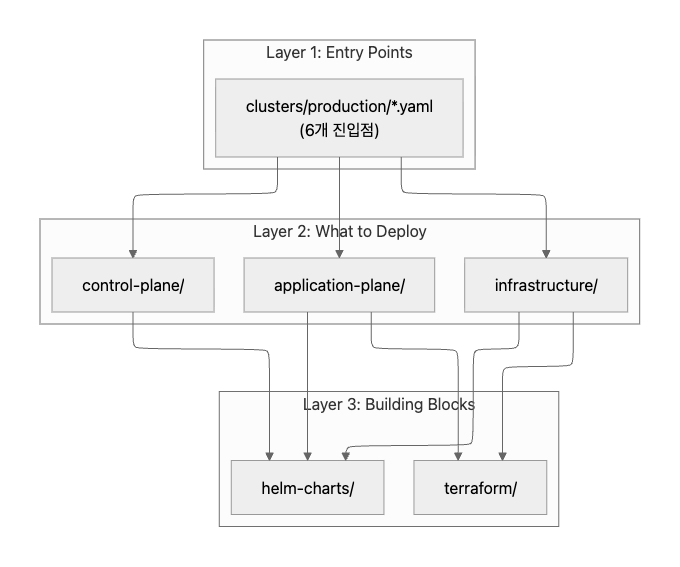
| Layer | 경로 | 역할 |
|---|---|---|
| Entry Points | clusters/production/*.yaml |
“이 클러스터에 뭘 배포할지” 최상위 선언 |
| What to Deploy | infrastructure/, control-plane/, application-plane/ |
선언된 내용물 (HelmRelease, CRD 등) |
| Building Blocks | helm-charts/, terraform/ |
재사용 가능한 부품 (Helm 차트, Terraform 모듈) |
루트 Kustomization: flux-system
모든 것의 시작점은 flux bootstrap 시 생성되는 루트 Kustomization인 flux-system이다. 이 리소스의 spec.path가 Flux가 가장 먼저 읽는 디렉토리를 결정한다.
# 루트 Kustomization 정의 — spec.path가 진입점 디렉토리를 가리킨다
apiVersion: kustomize.toolkit.fluxcd.io/v1
kind: Kustomization
metadata:
  name: flux-system
  namespace: flux-system
spec:
  interval: 10m0s
  path: clusters/production  # Layer 1 진입점
  prune: true
  sourceRef:
    kind: GitRepository
    name: flux-system
clusters/production 디렉토리 안의 YAML 파일들이 다른 모든 Kustomization을 정의하며, 여기서부터 나머지 계층이 파생된다.
clusters/<env>/구조는 Flux 공식 monorepo 예제의 표준 패턴이다.clusters/staging/을 추가하면 staging 클러스터만의 진입점 세트를 만들 수 있고, 각 진입점의spec.path를 환경별로 다르게 지정하면 된다. Layer 3의 Helm 차트나 Terraform 모듈은 환경 간에 그대로 재사용할 수 있다.
진입점(Entry Point) 구조 분석
clusters/production 폴더 구조
clusters/production/ 디렉토리에는 6개의 YAML 파일이 있다. 각 파일이 하나의 Kustomization을 정의하고, 그 Kustomization이 특정 디렉토리를 감시(watch)한다.
# 진입점 디렉토리 구조
$ tree clusters/production/
clusters/production/
├── control-plane.yaml
├── dependencies.yaml
├── infrastructure.yaml
├── pooled-envs.yaml
├── sources.yaml
└── tenants.yaml
진입점 매핑
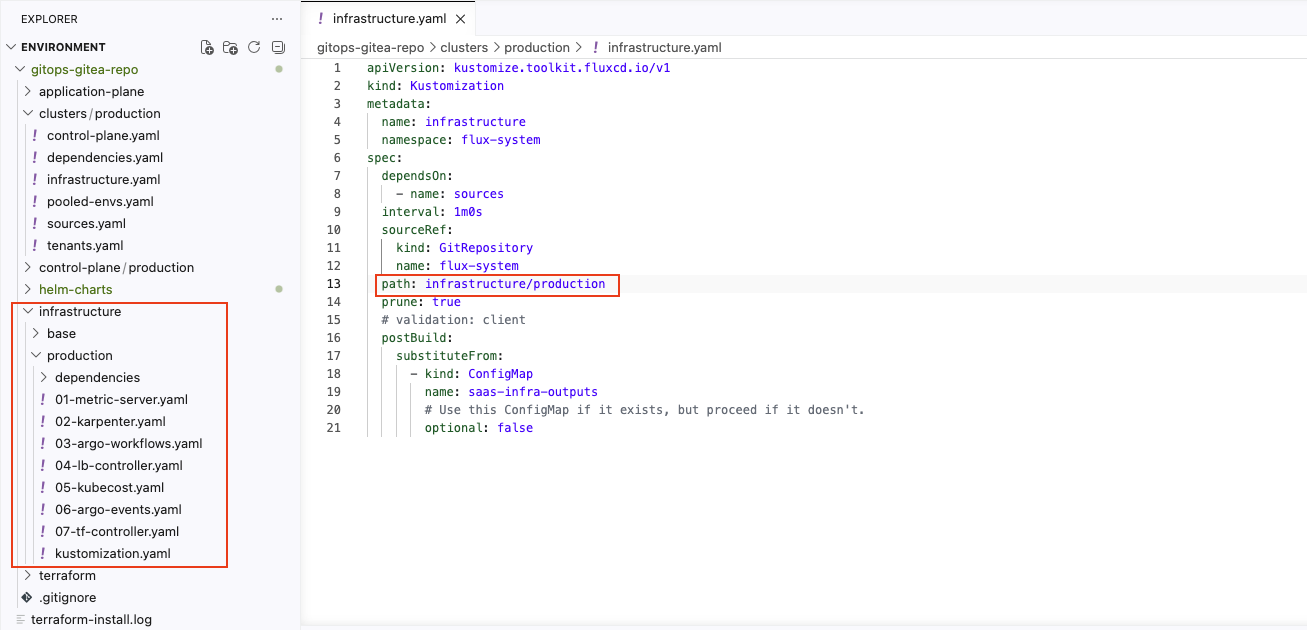
각 진입점 파일의 spec.path가 어떤 디렉토리를 가리키고, 무엇을 책임지는지 정리하면 다음과 같다.
| 진입점 파일 | Kustomization 이름 | spec.path |
책임 |
|---|---|---|---|
sources.yaml |
sources | infrastructure/base/sources/ |
소스 등록 (HelmRepo, GitRepo, ImageRepo) |
dependencies.yaml |
dependencies | infrastructure/production/dependencies/ |
선행 의존성 (Karpenter NodePool) |
infrastructure.yaml |
infrastructure | infrastructure/production/ |
클러스터 애드온 7개 |
control-plane.yaml |
controlplane | control-plane/production/ |
Onboarding 서비스 + Argo Workflows |
pooled-envs.yaml |
dataplane-pooled-envs | application-plane/production/pooled-envs/ |
공유 풀 (pool-1) |
tenants.yaml |
dataplane-tenants | application-plane/production/tenants/ |
테넌트별 환경 |
여기에 루트(flux-system)와 sources가 생성하는 자식 Kustomization(capacitor)까지 더하면, flux get kustomizations에서 보이는 총 8개가 된다.
| Kustomization 이름 | 출처 | 정체 |
|---|---|---|
flux-system |
부트스트랩 시 자동 생성 | 루트 — clusters/production 감시 |
sources |
clusters/production/sources.yaml |
진입점 1 |
dependencies |
clusters/production/dependencies.yaml |
진입점 2 |
infrastructure |
clusters/production/infrastructure.yaml |
진입점 3 |
controlplane |
clusters/production/control-plane.yaml |
진입점 4 |
dataplane-pooled-envs |
clusters/production/pooled-envs.yaml |
진입점 5 |
dataplane-tenants |
clusters/production/tenants.yaml |
진입점 6 |
capacitor |
sources Kustomization이 생성 | 자식 (Flux UI 대시보드) |
kustomization.yaml의 역할
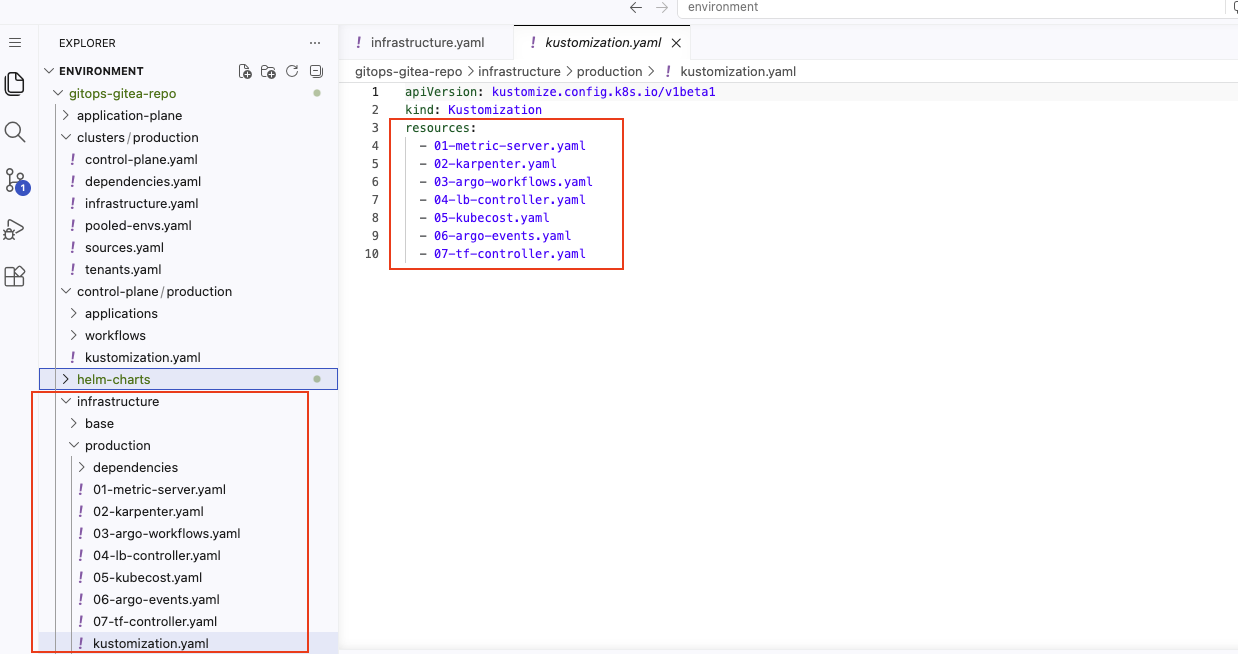
진입점의 spec.path가 가리키는 폴더에 kustomization.yaml이 있으면, 그 파일이 “목차” 역할을 한다. resources: 목록에 명시된 파일만 클러스터에 적용된다.
# infrastructure/production/kustomization.yaml — 적용할 리소스 목록을 명시
apiVersion: kustomize.config.k8s.io/v1beta1
kind: Kustomization
resources:
  - 01-metric-server.yaml
  - 02-karpenter.yaml
  - 03-argo-workflows.yaml
  - 04-lb-controller.yaml
  - 05-kubecost.yaml
  - 06-argo-events.yaml
  - 07-tf-controller.yaml
폴더에 파일을 추가해도 kustomization.yaml의 resources:에 등록하지 않으면 Flux가 무시한다. 진입점에서 실제 리소스까지의 확인 순서를 정리하면 다음과 같다.
| 단계 | 어디서 보나 | 무엇을 확인 |
|---|---|---|
| 1 | clusters/production/<X>.yaml의 spec.path |
어느 폴더로 갈지 |
| 2 | 그 폴더의 kustomization.yaml |
어떤 파일을 적용할지 |
| 3 | 각 0N-*.yaml |
실제 HelmRelease/리소스 정의 |
dependsOn 의존성 체인
진입점들은 dependsOn 필드로 실행 순서를 제어한다. 예를 들어, infrastructure.yaml의 핵심 spec을 보면 다음과 같다.
# clusters/production/infrastructure.yaml — dependsOn으로 sources 선행 보장
spec:
  dependsOn:
    - name: sources
  interval: 1m0s
  path: infrastructure/production
  prune: true
  sourceRef:
    kind: GitRepository
    name: flux-system
전체 의존성 체인을 다이어그램으로 그리면 다음과 같다.
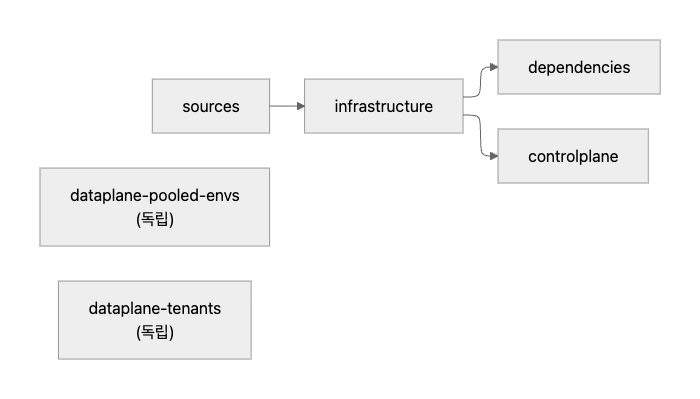
sources→infrastructure: 소스(HelmRepository 등)가 먼저 등록되어야 HelmRelease를 설치할 수 있다infrastructure→dependencies: Karpenter 컨트롤러가 먼저 설치되어야 NodePool을 생성할 수 있다infrastructure→controlplane: 인프라 애드온(Argo Events 등)이 먼저 있어야 Onboarding 서비스가 동작한다dataplane-pooled-envs,dataplane-tenants:dependsOn이 없으므로 독립적으로 reconcile된다
진입점 YAML 전문 (6개)
sources.yaml
apiVersion: kustomize.toolkit.fluxcd.io/v1
kind: Kustomization
metadata:
  name: sources
  namespace: flux-system
spec:
  interval: 1m0s
  sourceRef:
    kind: GitRepository
    name: flux-system
  path: infrastructure/base/sources
  prune: true
  postBuild:
    substituteFrom:
      - kind: ConfigMap
        name: saas-infra-outputs
        optional: false
dependencies.yaml
apiVersion: kustomize.toolkit.fluxcd.io/v1
kind: Kustomization
metadata:
  name: dependencies
  namespace: flux-system
spec:
  dependsOn:
    - name: infrastructure
  interval: 1m0s
  sourceRef:
    kind: GitRepository
    name: flux-system
  path: infrastructure/production/dependencies
  prune: true
  postBuild:
    substituteFrom:
      - kind: ConfigMap
        name: saas-infra-outputs
        optional: false
infrastructure.yaml
apiVersion: kustomize.toolkit.fluxcd.io/v1
kind: Kustomization
metadata:
  name: infrastructure
  namespace: flux-system
spec:
  dependsOn:
    - name: sources
  interval: 1m0s
  sourceRef:
    kind: GitRepository
    name: flux-system
  path: infrastructure/production
  prune: true
  postBuild:
    substituteFrom:
      - kind: ConfigMap
        name: saas-infra-outputs
        optional: false
control-plane.yaml
apiVersion: kustomize.toolkit.fluxcd.io/v1
kind: Kustomization
metadata:
  name: controlplane
  namespace: flux-system
spec:
  interval: 1m0s
  dependsOn:
    - name: infrastructure
  sourceRef:
    kind: GitRepository
    name: flux-system
  path: control-plane/production
  prune: true
  postBuild:
    substituteFrom:
      - kind: ConfigMap
        name: saas-infra-outputs
        optional: false
pooled-envs.yaml
apiVersion: kustomize.toolkit.fluxcd.io/v1
kind: Kustomization
metadata:
  name: dataplane-pooled-envs
  namespace: flux-system
spec:
  interval: 1m0s
  sourceRef:
    kind: GitRepository
    name: flux-system
  path: application-plane/production/pooled-envs
  prune: true
  postBuild:
    substituteFrom:
      - kind: ConfigMap
        name: saas-infra-outputs
        optional: false
tenants.yaml
apiVersion: kustomize.toolkit.fluxcd.io/v1
kind: Kustomization
metadata:
  name: dataplane-tenants
  namespace: flux-system
spec:
  interval: 1m0s
  sourceRef:
    kind: GitRepository
    name: flux-system
  path: application-plane/production/tenants
  prune: true
  postBuild:
    substituteFrom:
      - kind: ConfigMap
        name: saas-infra-outputs
        optional: false
진입점별 리소스 매핑
각 진입점이 실제로 어떤 리소스를 생성하는지 flux tree kustomization <name>으로 확인해 보자. 9개 HelmRelease가 어느 진입점에 속하는지가 핵심이다.
sources: 소스 등록
# 핵심 리소스만 발췌
$ flux tree kustomization sources
Kustomization/flux-system/sources
├── HelmRepository/flux-system/* (8개)    # 차트 저장소 주소 등록
├── GitRepository/flux-system/terraform-v0-0-1   # Terraform 모듈 소스
├── OCIRepository/flux-system/capacitor   # Flux UI
├── ImageRepository/flux-system/* (3개)   # ECR 이미지 감시
├── ImagePolicy/flux-system/* (3개)       # 이미지 태그 정책
├── ImageUpdateAutomation/flux-system/* (6개) # 자동 업데이트
├── CronJob/flux-system/ecr-credentials-sync  # ECR 인증
└── Kustomization/flux-system/capacitor   # Flux UI 대시보드 (자식 Kustomization)
HelmRelease를 만들지 않는다. “어디서 가져올지”만 등록하는 단계다. HelmRepository는 차트 카탈로그 서버 주소이고, 실제 차트를 설치하는 HelmRelease는 다른 진입점에서 정의한다. 카탈로그 등록과 설치를 분리하면, sources가 reconcile에 실패하더라도 이미 설치된 HelmRelease는 영향을 받지 않는다.
flux tree kustomization sources 전체 출력
$ flux tree kustomization sources
Kustomization/flux-system/sources
├── ServiceAccount/flux-system/ecr-credentials-sync
├── Role/flux-system/ecr-credentials-sync
├── RoleBinding/flux-system/ecr-credentials-sync
├── Service/flux-system/capacitor-lb
├── CronJob/flux-system/ecr-credentials-sync
├── ImagePolicy/flux-system/consumer-image-policy
├── ImagePolicy/flux-system/payments-image-policy
├── ImagePolicy/flux-system/producer-image-policy
├── ImageRepository/flux-system/consumer-image-repository
├── ImageRepository/flux-system/payments-image-repository
├── ImageRepository/flux-system/producer-image-repository
├── ImageUpdateAutomation/flux-system/consumer-update-automation-pooled-envs
├── ImageUpdateAutomation/flux-system/consumer-update-automation-tenants
├── ImageUpdateAutomation/flux-system/payments-update-automation-pooled-envs
├── ImageUpdateAutomation/flux-system/payments-update-automation-tenants
├── ImageUpdateAutomation/flux-system/producer-update-automation-pooled-envs
├── ImageUpdateAutomation/flux-system/producer-update-automation-tenants
├── Kustomization/flux-system/capacitor
│   ├── ClusterRole/capacitor
│   ├── ClusterRoleBinding/capacitor
│   ├── ServiceAccount/flux-system/capacitor
│   ├── Service/flux-system/capacitor
│   └── Deployment/flux-system/capacitor
├── GitRepository/flux-system/terraform-v0-0-1
├── HelmRepository/flux-system/argo
├── HelmRepository/flux-system/eks-charts
├── HelmRepository/flux-system/helm-application-chart
├── HelmRepository/flux-system/helm-tenant-chart
├── HelmRepository/flux-system/karpenter
├── HelmRepository/flux-system/kubecost
├── HelmRepository/flux-system/metrics-server
├── HelmRepository/flux-system/tf-controller
└── OCIRepository/flux-system/capacitor
dependencies: 선행 의존성
# 출력이 짧아 전체를 그대로 표시
$ flux tree kustomization dependencies
Kustomization/flux-system/dependencies
├── EC2NodeClass/default            # Karpenter가 사용할 EC2 설정
├── ConfigMap/default/dummy-configmap-dependencies
├── NodePool/application            # 애플리케이션용 노드 풀
└── NodePool/default                # 기본 노드 풀
HelmRelease를 만들지 않는다. Karpenter 컨트롤러 자체는 infrastructure에서 Helm 차트로 설치하지만, 그 컨트롤러가 “어떤 노드를 띄울지” 정의하는 NodePool은 별도 단계로 분리한다. 순서가 중요하다: infrastructure가 먼저 Karpenter Helm 차트를 설치한 뒤, dependencies가 그 위에 NodePool을 생성한다.
infrastructure: 클러스터 애드온
가장 큰 진입점으로, 7개 HelmRelease를 생성한다.
| HelmRelease | 차트 | 설치 네임스페이스 | 정의 파일 |
|---|---|---|---|
| metrics-server | metrics-server@3.11.0 | kube-system | 01-metric-server.yaml |
| karpenter | karpenter@1.4.0 | karpenter | 02-karpenter.yaml |
| argo-workflows | argo-workflows@0.40.11 | argo-workflows | 03-argo-workflows.yaml |
| aws-load-balancer-controller | aws-load-balancer-controller@1.6.2 | aws-system | 04-lb-controller.yaml |
| kubecost | cost-analyzer@2.1.0 | kubecost | 05-kubecost.yaml |
| argo-events | argo-events@2.4.3 | argo-events | 06-argo-events.yaml |
| tf-controller | tf-controller@0.16.0-rc.4 | flux-system | 07-tf-controller.yaml |
9개 HelmRelease 중 7개가 이 진입점에 집중되어 있다. 만약 infrastructure가 깨지면 클러스터 애드온 전체가 영향을 받으므로, dependsOn: sources로 소스 등록이 먼저 완료되도록 보장한다.
flux tree kustomization infrastructure 전체 출력
$ flux tree kustomization infrastructure
Kustomization/flux-system/infrastructure
├── Namespace/argo-events
├── Namespace/argo-workflows
├── Namespace/aws-system
├── Namespace/karpenter
├── Namespace/kubecost
├── ClusterRole/argo-events-cluster-role
├── ClusterRole/full-permissions-cluster-role
├── ClusterRoleBinding/argo-events-role-binding
├── ClusterRoleBinding/full-permissions-cluster-role-binding
├── ServiceAccount/argo-events/argo-events-sa
├── ServiceAccount/argo-workflows/argoworkflows-sa
├── HelmRelease/flux-system/argo-events
│   ├── ServiceAccount/argo-events/argo-events-controller-manager
│   ├── ServiceAccount/argo-events/argo-events-events-webhook
│   ├── ConfigMap/argo-events/argo-events-controller-manager
│   ├── CustomResourceDefinition/eventbus.argoproj.io
│   ├── CustomResourceDefinition/eventsources.argoproj.io
│   ├── CustomResourceDefinition/sensors.argoproj.io
│   ├── ClusterRole/argo-events-controller-manager
│   ├── ClusterRoleBinding/argo-events-controller-manager
│   └── Deployment/argo-events/argo-events-controller-manager
├── HelmRelease/flux-system/argo-workflows
│   ├── ServiceAccount/argo-workflows/argo-workflows-workflow-controller
│   ├── ServiceAccount/argo-workflows/argo-workflow
│   ├── ServiceAccount/argo-workflows/argo-workflows-server
│   ├── ConfigMap/argo-workflows/argo-workflows-workflow-controller-configmap
│   ├── CustomResourceDefinition/clusterworkflowtemplates.argoproj.io
│   ├── CustomResourceDefinition/cronworkflows.argoproj.io
│   ├── CustomResourceDefinition/workflowartifactgctasks.argoproj.io
│   ├── CustomResourceDefinition/workfloweventbindings.argoproj.io
│   ├── CustomResourceDefinition/workflows.argoproj.io
│   ├── CustomResourceDefinition/workflowtaskresults.argoproj.io
│   ├── CustomResourceDefinition/workflowtasksets.argoproj.io
│   ├── CustomResourceDefinition/workflowtemplates.argoproj.io
│   ├── ClusterRole/argo-workflows-view
│   ├── ClusterRole/argo-workflows-edit
│   ├── ClusterRole/argo-workflows-admin
│   ├── ClusterRole/argo-workflows-workflow-controller
│   ├── ClusterRole/argo-workflows-workflow-controller-cluster-template
│   ├── ClusterRole/argo-workflows-server
│   ├── ClusterRole/argo-workflows-server-cluster-template
│   ├── ClusterRoleBinding/argo-workflows-workflow-controller
│   ├── ClusterRoleBinding/argo-workflows-workflow-controller-cluster-template
│   ├── ClusterRoleBinding/argo-workflows-server
│   ├── ClusterRoleBinding/argo-workflows-server-cluster-template
│   ├── Role/argo-workflows/argo-workflows-workflow
│   ├── RoleBinding/argo-workflows/argo-workflows-workflow
│   ├── Service/argo-workflows/argo-workflows-server
│   ├── Deployment/argo-workflows/argo-workflows-workflow-controller
│   └── Deployment/argo-workflows/argo-workflows-server
├── HelmRelease/flux-system/aws-load-balancer-controller
│   ├── ServiceAccount/aws-system/aws-load-balancer-controller
│   ├── Secret/aws-system/aws-load-balancer-tls
│   ├── ClusterRole/aws-load-balancer-controller-role
│   ├── ClusterRoleBinding/aws-load-balancer-controller-rolebinding
│   ├── Role/aws-system/aws-load-balancer-controller-leader-election-role
│   ├── RoleBinding/aws-system/aws-load-balancer-controller-leader-election-rolebinding
│   ├── Service/aws-system/aws-load-balancer-webhook-service
│   ├── Deployment/aws-system/aws-load-balancer-controller
│   ├── MutatingWebhookConfiguration/aws-load-balancer-webhook
│   ├── ValidatingWebhookConfiguration/aws-load-balancer-webhook
│   ├── IngressClassParams/alb
│   └── IngressClass/alb
├── HelmRelease/flux-system/karpenter
│   ├── PodDisruptionBudget/karpenter/karpenter
│   ├── ServiceAccount/karpenter/karpenter
│   ├── ClusterRole/karpenter-admin
│   ├── ClusterRole/karpenter-core
│   ├── ClusterRole/karpenter
│   ├── ClusterRoleBinding/karpenter-core
│   ├── ClusterRoleBinding/karpenter
│   ├── Role/karpenter/karpenter
│   ├── Role/kube-system/karpenter-dns
│   ├── RoleBinding/karpenter/karpenter
│   ├── RoleBinding/kube-system/karpenter-dns
│   ├── Service/karpenter/karpenter
│   └── Deployment/karpenter/karpenter
├── HelmRelease/flux-system/kubecost
│   ├── ServiceAccount/kubecost/kubecost-cost-analyzer
│   ├── ServiceAccount/kubecost/kubecost-prometheus-node-exporter
│   ├── ServiceAccount/kubecost/kubecost-prometheus-server
│   ├── ConfigMap/kubecost/kubecost-cost-analyzer
│   ├── ConfigMap/kubecost/nginx-conf
│   ├── ConfigMap/kubecost/network-costs-config
│   ├── ConfigMap/kubecost/external-grafana-config-map
│   ├── ConfigMap/kubecost/cluster-controller-continuous-cluster-sizing
│   ├── ConfigMap/kubecost/cluster-controller-nsturndown-config
│   ├── ConfigMap/kubecost/cluster-controller-container-rightsizing-config
│   ├── ConfigMap/kubecost/kubecost-prometheus-server
│   ├── PersistentVolumeClaim/kubecost/kubecost-cost-analyzer
│   ├── PersistentVolumeClaim/kubecost/kubecost-prometheus-server
│   ├── ClusterRole/kubecost-cost-analyzer
│   ├── ClusterRole/kubecost-prometheus-server
│   ├── ClusterRoleBinding/kubecost-cost-analyzer
│   ├── ClusterRoleBinding/kubecost-prometheus-server
│   ├── Role/kubecost/kubecost-cost-analyzer
│   ├── RoleBinding/kubecost/kubecost-cost-analyzer
│   ├── Service/kubecost/kubecost-cloud-cost
│   ├── Service/kubecost/kubecost-aggregator
│   ├── Service/kubecost/kubecost-network-costs
│   ├── Service/kubecost/kubecost-cost-analyzer
│   ├── Service/kubecost/kubecost-forecasting
│   ├── Service/kubecost/kubecost-prometheus-node-exporter
│   ├── Service/kubecost/kubecost-prometheus-server
│   ├── DaemonSet/kubecost/kubecost-network-costs
│   ├── DaemonSet/kubecost/kubecost-prometheus-node-exporter
│   ├── Deployment/kubecost/kubecost-cost-analyzer
│   ├── Deployment/kubecost/kubecost-forecasting
│   └── Deployment/kubecost/kubecost-prometheus-server
├── HelmRelease/flux-system/metrics-server
│   ├── ServiceAccount/kube-system/metrics-server
│   ├── ClusterRole/system:metrics-server-aggregated-reader
│   ├── ClusterRole/system:metrics-server
│   ├── ClusterRoleBinding/metrics-server:system:auth-delegator
│   ├── ClusterRoleBinding/system:metrics-server
│   ├── RoleBinding/kube-system/metrics-server-auth-reader
│   ├── Service/kube-system/metrics-server
│   ├── Deployment/kube-system/metrics-server
│   └── APIService/v1beta1.metrics.k8s.io
└── HelmRelease/flux-system/tf-controller
    ├── ServiceAccount/flux-system/tf-controller
    ├── ServiceAccount/flux-system/tf-runner
    ├── Secret/flux-system/tf-runner.cache-encryption
    ├── ClusterRole/tf-cluster-reconciler-role
    ├── ClusterRole/tf-manager-role
    ├── ClusterRole/tf-runner-role
    ├── ClusterRoleBinding/tf-cluster-reconciler
    ├── ClusterRoleBinding/tf-manager-rolebinding
    ├── ClusterRoleBinding/tf-runner-rolebinding
    ├── Role/flux-system/tf-leader-election-role
    ├── RoleBinding/flux-system/tf-leader-election-rolebinding
    └── Deployment/flux-system/tf-controller
controlplane: SaaS 운영 도구
# 출력 전체를 그대로 표시
$ flux tree kustomization controlplane
Kustomization/flux-system/controlplane
├── Namespace/onboarding-service
├── EventBus/argo-events/default
├── EventSource/argo-events/aws-sqs-deployment
├── EventSource/argo-events/aws-sqs-offboarding
├── EventSource/argo-events/aws-sqs-onboarding
├── Sensor/argo-events/aws-sqs-deployment
├── Sensor/argo-events/aws-sqs-offboarding
├── Sensor/argo-events/aws-sqs-onboarding
├── WorkflowTemplate/argo-workflows/tenant-deployment-template
├── WorkflowTemplate/argo-workflows/tenant-offboarding-template
├── WorkflowTemplate/argo-workflows/tenant-onboarding-template
└── HelmRelease/flux-system/onboarding-service
    ├── ServiceAccount/onboarding-service/onboarding-service-application-chart
    ├── Service/onboarding-service/onboarding-service-application-chart
    └── Deployment/onboarding-service/onboarding-service-application-chart
HelmRelease 1개(onboarding-service)와 함께, Argo Events의 EventSource/Sensor 3쌍(onboarding, offboarding, deployment)과 Argo Workflows의 WorkflowTemplate 3개를 생성한다. SQS 메시지를 받아 테넌트 관련 워크플로우를 실행하는 이벤트 기반(event-driven) 구조다.
dataplane-pooled-envs: 공유 풀
# 출력 전체를 그대로 표시
$ flux tree kustomization dataplane-pooled-envs
Kustomization/flux-system/dataplane-pooled-envs
├── Namespace/pool-1
└── HelmRelease/flux-system/pool-1
    ├── ServiceAccount/pool-1/pool-1-consumer
    ├── ServiceAccount/pool-1/pool-1-producer
    ├── Deployment/pool-1/pool-1-consumer
    ├── Deployment/pool-1/pool-1-producer
    └── Terraform/flux-system/pool-1    # tf-controller가 처리하는 Terraform CRD
HelmRelease 1개(pool-1)를 생성한다. Producer/Consumer Deployment와 함께, Terraform/flux-system/pool-1 CRD가 포함되어 있다. 이 Terraform CRD는 tf-controller가 처리하여 AWS 리소스(SQS, DynamoDB 등)를 프로비저닝한다.
dataplane-tenants: 테넌트별 환경
# 출력 전체를 그대로 표시
$ flux tree kustomization dataplane-tenants
Kustomization/flux-system/dataplane-tenants
├── ConfigMap/default/dummy-configmap-advanced
├── ConfigMap/default/dummy-configmap-basic
└── ConfigMap/default/dummy-configmap-premium
현재는 ConfigMap 3개뿐이다. basic, advanced, premium 세 티어의 더미(placeholder) ConfigMap만 있을 뿐, HelmRelease도 Terraform CRD도 없다.
이 진입점이 비어 있는 것은 의도된 설계다. 새 테넌트 온보딩 시 Argo Workflows가 이 경로(application-plane/production/tenants/)에 Terraform CRD와 HelmRelease를 자동으로 추가하게 된다. Tofu Controller 실습에서 이 빈 공간에 실제로 CRD를 추가하는 과정을 다룬다.
HelmRelease 분포 요약
9개 HelmRelease의 진입점별 분포를 정리하면 다음과 같다.
| 진입점 | HelmRelease 수 | 목록 |
|---|---|---|
| infrastructure | 7 | metrics-server, karpenter, argo-workflows, aws-load-balancer-controller, kubecost, argo-events, tf-controller |
| controlplane | 1 | onboarding-service |
| dataplane-pooled-envs | 1 | pool-1 |
| sources | 0 | (소스 등록만) |
| dependencies | 0 | (Karpenter NodePool/EC2NodeClass만) |
| dataplane-tenants | 0 | (더미 ConfigMap만, 추후 채워질 자리) |
진입점 분리의 설계 원리
6개 진입점을 분리하는 이유는 Flux 공식 monorepo 예제에서도 권장하는 표준 구조로, 다음과 같은 이점이 있다.
- 장애 격리: sources에 네트워크 문제가 생겨도, 이미 설치된 HelmRelease는 영향을 받지 않는다
- 의존성 관리 단순화: infrastructure는 sources만 의존하면 된다. NodePool 같은 후행 설정은 dependencies로 분리하여 의존 사슬을 명확하게 만든다
- 재사용성: 다른 클러스터(
clusters/staging/)를 추가할 때 sources를 그대로 복사하고, NodePool만 다르게 하려면 dependencies만 바꾸면 된다 - Reconcile 빈도 분리: sources는 이미지 태그를 자주 감시해야 하지만, NodePool은 거의 변경되지 않는다. 분리되어 있으면 각자 적절한 interval로 운영할 수 있다
핵심 포인트
flux get all vs. flux tree
두 명령어가 보여주는 것의 차이를 명확히 구분해야 한다.
| 명령어 | 보여주는 것 | 비유 |
|---|---|---|
flux get all |
Flux에게 일을 시키는 입력 선언 (HelmRelease, Kustomization 등) | 설계도 목록 |
flux tree |
입력 선언이 만들어낸 결과물 (Deployment, Service 등) | 완성된 건물 |
예를 들어, flux get all에는 HelmRelease/kubecost가 나오지만, 이것이 실제로 만든 Deployment/kubecost-cost-analyzer, Service/kubecost-cost-analyzer 등의 결과물은 나오지 않는다. 결과물까지 보려면 flux tree를 사용해야 한다.
dataplane-tenants는 왜 비어 있는가
현재 dataplane-tenants에는 더미 ConfigMap 3개뿐이다. 이 진입점은 테넌트 온보딩 자동화가 완성되면 다음과 같은 리소스가 추가될 자리다.
- Terraform CRD: AWS 리소스(SQS, DynamoDB, IAM Role 등)를 프로비저닝
- HelmRelease: 테넌트별 애플리케이션 배포
비어 있는 dataplane-tenants는 의도된 설계이며, Tofu Controller 실습에서 이 공간을 채워 나간다.
정리
이 글에서 분석한 Flux 아키텍처의 핵심은 “어떤 파일을 건드리면 클러스터의 어디가 바뀌는가”를 파악하는 것이다. 최종 매핑을 표로 정리하면 다음과 같다.
| 수정 대상 | 영향 범위 |
|---|---|
infrastructure/base/sources/ |
HelmRepository, GitRepository, ImageRepository 등록 변경 |
infrastructure/production/dependencies/ |
Karpenter NodePool, EC2NodeClass 변경 |
infrastructure/production/0N-*.yaml |
클러스터 애드온 7개 (metrics-server, karpenter, kubecost 등) |
control-plane/production/ |
Onboarding 서비스, Argo WorkflowTemplate/EventSource/Sensor |
application-plane/production/pooled-envs/ |
pool-1 HelmRelease (Producer/Consumer + Terraform CRD) |
application-plane/production/tenants/ |
테넌트별 환경 (현재 비어 있음, 추후 CRD 추가 예정) |
clusters/production/*.yaml |
진입점 자체의 설정 (interval, dependsOn 등) |
전체 흐름은 다음 3단계로 요약된다.
clusters/production/*.yaml의spec.path에서 대상 디렉토리 확인- 해당 디렉토리의
kustomization.yaml에서 적용할 파일 목록 확인 - 각 파일의 HelmRelease/CRD 정의를 확인
이 구조를 머릿속에 그릴 수 있다면, 이후 Terraform 모듈 테스트나 테넌트 온보딩 실습에서 “어떤 파일을 어디에 추가해야 하는가”를 바로 판단할 수 있다.

댓글남기기